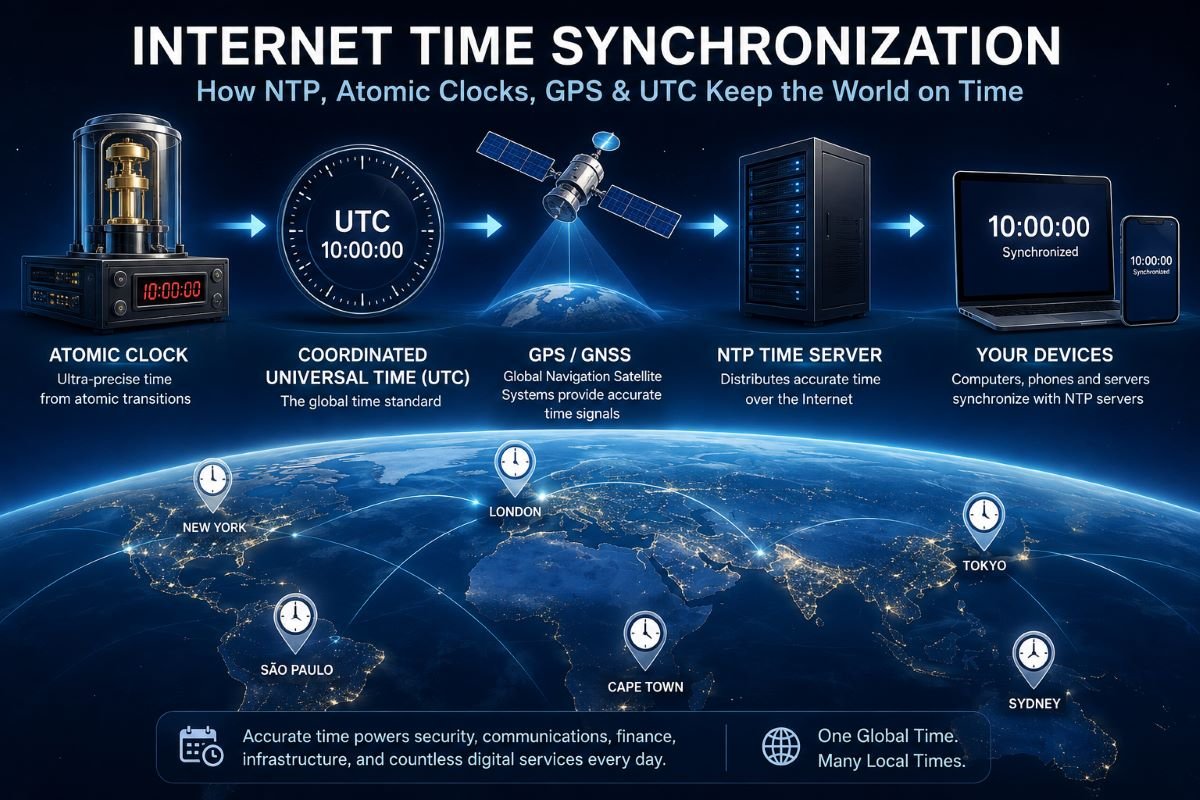
Introduction: How Does the Internet Know What Time It Is?
Every time you open a website, send an email, make an online payment, join a video meeting, check a flight schedule, or look at the clock on your phone, you depend on something that is easy to overlook: accurate time synchronization.
Your laptop has a clock. Your phone has a clock. Every server on the Internet has a clock. Routers, databases, cloud platforms, data centers, financial systems, telecommunications networks, and security systems all depend on clocks as well.
But computer clocks are not perfect.
The oscillator inside a device can gradually gain or lose time. Temperature, aging, manufacturing differences, hardware characteristics, power conditions, virtualization, and other factors can cause a local clock to drift away from a trusted reference.
If every device simply relied on its own internal clock, computers around the world would slowly disagree.
The Internet solves this problem through time synchronization.
One of the most important technologies involved is the Network Time Protocol (NTP). NTP allows networked computers and devices to compare their local clocks with remote time sources and make controlled corrections.
But NTP is only one layer of a much larger timing system.
Behind Internet time synchronization are:
- Atomic clocks
- Coordinated Universal Time (UTC)
- National timing laboratories
- GPS and other GNSS systems
- Primary and secondary time servers
- NTP clients and servers
- Operating-system clocks
- Network timing measurements
- Clock-discipline algorithms
- Precision timing technologies such as PTP
- Security mechanisms for protecting time information
This guide explains how those pieces fit together, why computer clocks drift, how NTP estimates clock offset, where Internet time ultimately comes from, why network latency limits accuracy, and why accurate time matters to modern digital infrastructure.
Part 1: The Foundations of Internet Time Synchronization
What Is Internet Time Synchronization?
Internet time synchronization is the process of keeping a computer or network device's clock aligned with a trusted reference time through network-based time services and synchronization protocols.
A simplified timing chain looks like this:
Trusted Reference → Time Server → Network → Computer → Local System Clock
A computer does not normally contain an atomic clock. Instead, it can periodically communicate with a reliable time server, compare its own clock with the server's reference, estimate the difference, and adjust its clock.
This process can happen automatically in the background.
The user may only see the result: a clock that appears to remain correct.
The underlying process is considerably more sophisticated.
NTP is designed specifically for synchronization across packet-switched networks, where communication delay can vary. The protocol has been standardized and developed over decades to address this problem.
Why Does Internet Time Synchronization Matter?
A clock that is a few seconds wrong may seem harmless when a person is simply checking the time.
Modern computer systems, however, use timestamps for much more than displaying hours and minutes.
Security
Digital certificates, authentication systems, security tokens, logs, and other security mechanisms can depend on time.
If a computer believes the current date is wrong, a certificate that is actually valid may appear expired or not yet valid.
Databases
Distributed databases use timestamps for records, replication, auditing, event processing, and operational logging.
When multiple servers disagree significantly about time, reconstructing the order of events becomes more difficult.
Cloud infrastructure
Modern applications may span many servers, virtual machines, containers, availability zones, and data centers.
Consistent timestamps make logs, monitoring, debugging, and distributed operations much easier to manage.
Financial systems
Financial infrastructure depends heavily on accurate timestamps for transactions, orders, market events, auditing, and regulatory requirements.
Telecommunications
Network infrastructure often requires synchronized frequency and time references so that equipment can coordinate operations.
Scientific and industrial systems
Experiments, measurement systems, industrial machinery, and power infrastructure can require much tighter synchronization than ordinary consumer devices.
The required accuracy therefore depends on the application.
Why Can't Computers Keep Perfect Time?
A computer clock depends on an oscillator.
The oscillator produces a regular electrical signal that the hardware and operating system can use as a timing reference.
However, the oscillator is not perfectly stable.
Its frequency can change because of:
- Temperature
- Aging
- Manufacturing tolerances
- Voltage changes
- Hardware characteristics
- Environmental conditions
A tiny frequency difference may be invisible initially but accumulate over time.
That accumulated difference is clock drift.
For this reason, an Internet-connected device needs periodic synchronization with an external reference.
Clock Drift and Clock Offset
Two concepts are central to time synchronization.
Clock drift
Clock drift describes how the rate of a local clock differs from the reference.
For example, if a clock gains a tiny amount of time every second, its error grows progressively.
Clock offset
Clock offset is the difference between the local clock and the reference at a particular moment.
For example:
Reference: 12:00:00.000Computer: 11:59:59.800
The computer is approximately 200 milliseconds behind.
A synchronization system attempts to estimate that offset and correct the clock.
Drift explains why the offset changes again after the correction.
Where Does the Correct Time Come From?
This is the deeper question.
If a computer gets time from an NTP server, where does that server get its time?
The chain eventually reaches highly accurate physical reference clocks.
A simplified model is:
Atomic Clocks
↓
National Timing Laboratories
↓
International Time Scales and UTC
↓
GPS/GNSS and Other Time-Transfer Systems
↓
Primary Time Servers
↓
NTP Infrastructure
↓
Computers and Network Devices
Modern Internet time therefore connects computer networking with physics and metrology.
What Is UTC?
UTC stands for Coordinated Universal Time.
UTC is the primary international reference for civil time.
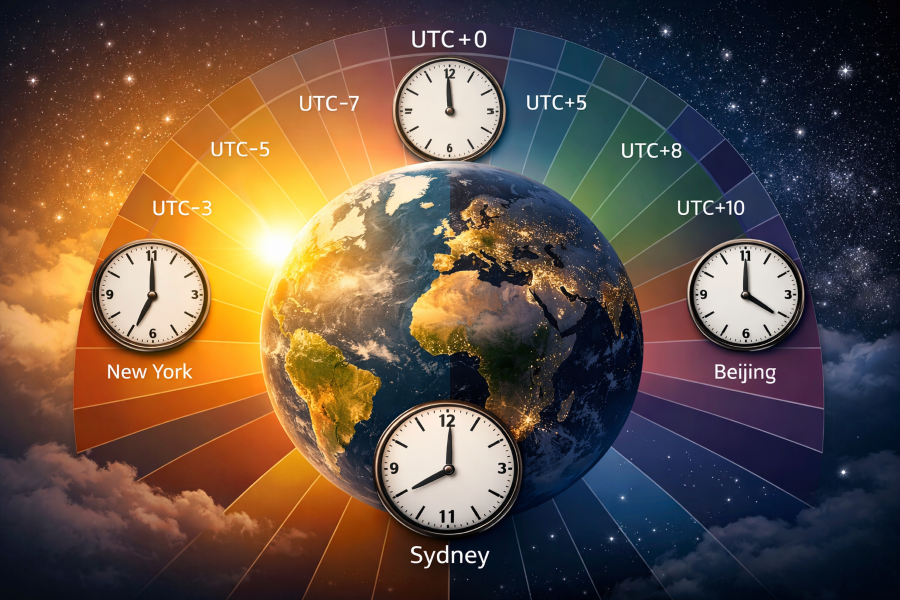
It is not itself a geographic time zone such as India Standard Time or Eastern Time.
Instead, UTC acts as the common baseline from which local time zones are expressed.
Examples include:
- UTC+00:00
- UTC+05:30
- UTC-05:00
- UTC+09:00
For example, India Standard Time is UTC+05:30.
A global time application can therefore start with a common UTC instant and apply the relevant time-zone rules to determine the local civil time.
This separation between reference time and local time is fundamental to world-clock software.
Why UTC Matters to GlobalTime.io
A world clock must solve two different problems:
- Determine the correct reference time.
- Convert that instant into the local time of a geographic location.
The first problem depends on accurate time synchronization.
The second depends on time-zone rules.
This means:
Accurate reference time + accurate time-zone data = reliable world clock
A world clock is therefore the visible end of a much larger timing infrastructure.
Part 2: How NTP Actually Synchronizes Internet Clocks
What Is NTP?
NTP stands for Network Time Protocol.
It is a protocol designed to synchronize computer clocks over packet-based networks.
NTP can operate across:
- Local networks
- Enterprise networks
- Data centers
- Cloud infrastructure
- Private networks
- The public Internet
The key challenge is that a time packet does not travel instantly.
The client must account for network delay while estimating the difference between its own clock and the server's clock.
This is why NTP is more than a simple request such as:
“What time is it?”
It is a measurement and estimation process.
The Basic NTP Client-Server Model
Two systems are involved in the simplest model:
NTP client
The device that needs synchronized time.
Examples:
- Laptop
- Desktop
- Smartphone
- Server
- Router
- Virtual machine
- Network appliance
NTP server
The system providing a reference time.
The server may itself synchronize from:
- Atomic clocks
- GPS/GNSS
- National timing services
- Other NTP servers
- Specialized timing infrastructure
Therefore, an NTP server is not necessarily the ultimate source of time.
It may be one level in a hierarchy.
The Four NTP Timestamps
A basic NTP exchange uses four important timestamps:
- T1: client sends request
- T2: server receives request
- T3: server sends response
- T4: client receives response
The sequence is:
Client T1 → Server T2 → Server T3 → Client T4
These timestamps allow the client to estimate both network delay and clock offset.
Why Four Timestamps Are Needed
Imagine a computer sends a request at:
10:00:00.000
The server receives it at:
10:00:00.020
The server responds at:
10:00:00.021
The computer receives the response at:
10:00:00.041
The computer cannot simply assume that the server is 20 milliseconds ahead.
The packet itself took time to travel.
NTP uses the four timestamps to separate, as far as possible, the network delay from the difference between the clocks.
NTP Clock Offset
A simplified NTP offset calculation is:
Offset = ((T2 − T1) + (T3 − T4)) / 2
The equation combines the outbound and inbound timing measurements.
It is based on an important assumption: the network delays in both directions are approximately symmetrical.
Real networks are not always symmetrical, which creates uncertainty. More advanced NTP processing therefore considers multiple observations and their quality.
NTP Round-Trip Delay
A simplified expression for round-trip delay is:
Delay = (T4 − T1) − (T3 − T2)
This estimates the time spent transporting the request and response through the network.
The client needs this information because a remote timestamp cannot be interpreted correctly without considering transmission delay.
A Simple NTP Example
Suppose:
T1 = 10:00:00.000T2 = 10:00:00.025T3 = 10:00:00.026T4 = 10:00:00.051
The total round trip is 51 milliseconds, while the server spent about 1 millisecond between receiving and transmitting the packet.
The NTP calculation combines these timestamps to estimate the clock offset.
The important lesson is that NTP does not need a dedicated physical clock connection between the two devices.
It estimates their relationship through network measurements.
The Problem of Network Asymmetry
Suppose the request takes:
10 ms
to reach the server, but the response takes:
30 ms
to return.
The round trip is still:
40 ms
but the two directions are not equal.
The client cannot perfectly determine the split from the total alone.
This asymmetry can create an error in the estimated clock offset.
That is one of the fundamental limits of Internet-based time synchronization.
What Is NTP Jitter?
Network delay changes.
One measurement might show:
18 ms
another:
21 ms
another:
19 ms
and another:
42 ms
The variation is associated with network jitter.
Possible causes include:
- Congestion
- Router queues
- Wireless interference
- Routing changes
- Server load
- Packet processing
A robust NTP implementation therefore does not blindly trust one measurement.
It evaluates a series of observations.
Why NTP Uses Multiple Time Servers
A client can be configured with multiple NTP sources.
For example:
Server AServer BServer CServer D
Multiple sources provide:
- Redundancy
- Better fault tolerance
- Independent measurements
- Detection of unusual results
- More opportunities to obtain stable timing
If one source becomes unreachable or unreliable, another can remain available.
NTP Server Selection
A synchronization client can consider:
- Reachability
- Delay
- Offset
- Jitter
- Reference quality
- Agreement with other sources
- Synchronization state
This means the fastest responding server is not automatically the best source.
A server with slightly higher latency may provide a more stable timing estimate.
What Is NTP Stratum?
NTP uses stratum to describe the position of a time source in the synchronization hierarchy.
A simplified hierarchy is:
Reference Clock
↓
Stratum 1
↓
Stratum 2
↓
Stratum 3
↓
Client
A lower stratum generally means that the source is closer to a reference clock in the hierarchy.
However, stratum is not a direct measurement of accuracy.
A Stratum 1 server is not automatically better in every real-world situation than every Stratum 2 server.
Network conditions, reference quality, implementation, and configuration all matter.
Stratum 0 Reference Clocks
At the conceptual top are reference clocks, often described as Stratum 0 devices.
Examples can include:
- Atomic clocks
- GNSS timing receivers
- Precision reference sources
These are reference sources rather than ordinary NTP servers.
Stratum 1 Servers
A Stratum 1 server is directly synchronized to a reference source.
For example:
GNSS Receiver → Stratum 1 NTP Server
The server can then distribute accurate time to downstream systems.
Stratum 2 and Beyond
A Stratum 2 server synchronizes from a higher-level source.
This creates a scalable hierarchy:
Reference → Stratum 1 → Stratum 2 → Stratum 3 → Clients
A hierarchy prevents every device from independently connecting to a small number of primary timing sources.
Clock Stepping and Clock Slewing
After determining that the local clock is wrong, the synchronization software must decide how to correct it.
Clock stepping
The clock is changed immediately.
For example:
10:00:00 → 10:00:05
Clock slewing
The clock rate is adjusted gradually so that the local clock converges toward the reference.
For small offsets, gradual correction can avoid sudden backward or forward jumps in wall-clock time.
The exact behavior depends on the operating system and synchronization software.
Why Synchronization Is Continuous
Synchronization is not a one-time operation.
The local oscillator continues to drift.
Network conditions change.
The reference relationship can change.
Therefore, the basic cycle is:
Measure → Compare → Estimate → Correct → Monitor → Repeat
This continuous process keeps the clock close to the reference.
NTP vs a Normal Time API
A normal HTTP time API might return:
2026-08-11T12:00:00Z
The client receives that response after some network delay.
The timestamp is therefore already slightly old by the time it arrives.
NTP was specifically designed to estimate clock relationships while accounting for packet timing.
An HTTP API can be useful for applications that simply need a current timestamp, but it is not automatically equivalent to a clock synchronization protocol.
NTP vs SNTP
SNTP stands for Simple Network Time Protocol.
It uses the NTP packet format and basic timing concepts but is designed for simpler implementations.
SNTP can be appropriate for:
- Embedded devices
- Simple network appliances
- Systems with modest timing requirements
A full NTP implementation can provide more sophisticated filtering, selection, and clock-discipline behavior.
Part 3: Atomic Clocks, UTC, GPS and the Source of Internet Time
Where Does Accurate Internet Time Begin?
The Internet does not invent time.
Its timing ultimately depends on physical reference clocks and international measurement systems.
A simplified chain is:
Atomic Clocks
↓
National Timing Laboratories
↓
International Time Scales / UTC
↓
GPS/GNSS and Other Time-Transfer Systems
↓
Primary Time Servers
↓
NTP Servers
↓
Computers
Understanding this chain explains why Internet time synchronization is connected to both physics and networking.
What Is an Atomic Clock?
An atomic clock uses properties of atoms as a reference for measuring time.
A traditional mechanical clock depends on a pendulum or balance wheel.
A quartz clock depends on a quartz oscillator.
An atomic clock uses a precisely controlled atomic transition as a frequency reference.
Atomic transitions are extremely stable and reproducible, making them useful for defining and maintaining precise time and frequency standards.
Why Atoms Are Useful for Timekeeping
Atoms can transition between specific energy states.
These transitions correspond to extremely precise frequencies.
A clock can compare an electronic oscillator with an atomic reference and continually correct the oscillator.
The result is an exceptionally stable frequency standard.
This is the scientific foundation beneath modern precision timekeeping.
The Definition of the Second
The SI second is defined using the cesium-133 atom.
The defining frequency is:
9,192,631,770 cycles per second
The significance is that the second is tied to a reproducible physical phenomenon rather than the variable rotation of Earth.
This provides an internationally consistent basis for measuring time.
Why Earth's Rotation Is Not Enough
Earth's rotation is not perfectly uniform.
Its rate changes slightly because of complex geophysical processes involving the atmosphere, oceans, Earth's interior, and gravitational interactions.
For ordinary life, those changes are tiny.
For precision metrology, they are significant.
Atomic time therefore provides a much more stable reference.
UTC and International Timekeeping
UTC is produced from international atomic-time measurements.
Timing laboratories around the world maintain ensembles of precision clocks.
Their measurements contribute to international time scales coordinated through the global metrology system.
This means there is not one physical "world clock" sitting in a single location.
Instead, global time is based on a distributed system of highly accurate clocks and international measurement.
TAI and UTC
Two important time scales are:
TAI — International Atomic Time
and
UTC — Coordinated Universal Time
TAI is an atomic timescale based on measurements from precision clocks.
UTC is derived from atomic time while maintaining the historical relationship between civil time and Earth's rotation.
This distinction becomes important when discussing leap seconds and the relationship between atomic and astronomical time.
GPS as a Timing System
GPS is commonly associated with navigation.
But GPS is also a highly important timing system.
GPS satellites carry accurate clocks, and receivers use signal timing to determine position.
The basic principle is:
Timing information → Distance measurement → Position
Because positioning depends on timing, GPS satellites need highly stable clocks.
The same timing signals can be used as a reference for synchronization.
GPS Time and UTC Are Different
GPS time and UTC are related but are not identical time scales.
GPS time is continuous and does not insert leap seconds in the same way UTC does.
GPS systems broadcast information that allows receivers to determine the relationship between GPS time and UTC.
Professional timing receivers can therefore use GNSS signals to generate a UTC-related reference.
GNSS: More Than GPS
GPS is one of several global navigation satellite systems.
Other major systems include:
- Galileo
- GLONASS
- BeiDou
The general term is GNSS — Global Navigation Satellite System.
Professional timing receivers may use multiple constellations to improve availability and resilience.
GPS-Disciplined Oscillators
A GPS-disciplined oscillator (GPSDO) combines a stable local oscillator with an external GNSS timing reference.
The local oscillator provides short-term stability.
The GNSS signal provides a long-term reference.
The system compares the two and adjusts the oscillator to reduce error.
This produces a powerful local timing reference.
A simplified architecture is:
GNSS → GPSDO → Local Reference → NTP/PTP → Network Devices
National Timing Laboratories
National measurement laboratories maintain highly accurate clocks and provide timing services.
In the United States, NIST is a major source of official time and provides Internet time services.
Other countries operate their own national timing infrastructure.
These laboratories contribute to international timekeeping and provide ways to transfer accurate time to practical systems.
How Accurate Time Reaches the Internet
A typical chain can be:
Atomic Reference
↓
National Timing Laboratory
↓
Primary Time Source
↓
Stratum 1 Server
↓
Stratum 2 Server
↓
Public or Private NTP Service
↓
Computer
Each layer makes the reference more accessible to the next layer.
The final user does not need to know anything about the atomic clock.
The synchronization infrastructure hides that complexity.
Why We Do Not Put Atomic Clocks in Every Computer
An atomic clock would be unnecessary and impractical for most consumer devices.
A normal laptop does not require laboratory-level timing.
A smartphone does not need a cesium standard inside it.
A web server can obtain sufficiently accurate time through network synchronization.
Therefore, modern infrastructure uses a hierarchy:
A relatively small number of highly accurate references
instead of:
Billions of highly accurate local clocks
This makes global time distribution practical.
Frequency Stability
A clock is fundamentally an oscillator.
If the oscillator frequency is too high, the clock gains time.
If it is too low, the clock loses time.
This is why engineers care about frequency stability, not only the displayed clock value.
A clock can be temporarily accurate but have a poor frequency stability, causing its offset to grow quickly.
A high-quality oscillator can maintain its relationship with the reference for longer periods.
Cesium, Rubidium, Hydrogen Masers and Optical Clocks
Different applications use different timing technologies.
Cesium clocks
Cesium is central to the SI definition of the second.
Rubidium clocks
Rubidium frequency standards provide good stability in compact and practical systems.
Hydrogen masers
Hydrogen masers provide exceptional short-term frequency stability and are used in advanced timing and scientific environments.
Optical clocks
Optical clocks use much higher-frequency atomic transitions and have demonstrated extraordinary precision in laboratory research.
These technologies represent different points on the accuracy, stability, size, complexity, and cost spectrum.
Time and Frequency
A useful way to think about a clock is:
Time is accumulated frequency.
A clock counts cycles of an oscillator.
If those cycles occur at exactly the intended rate, the clock stays aligned with the reference.
If the frequency differs slightly, the timing error accumulates.
That is why synchronization systems need to consider both:
Current offset
and
frequency behavior
UTC vs Local Time
UTC is a global reference.
Local time is obtained by applying geographic time-zone rules.
For example:
UTC → Time-Zone Rules → Local Time
India uses:
UTC+05:30
but a region that observes daylight saving time may use different offsets during different parts of the year.
Therefore, software should not confuse a fixed UTC offset with a geographic time zone.
Time Zones Are Rule Sets
A time zone is more than:
UTC + number
A named time zone can include:
- Standard time
- Daylight saving transitions
- Historical changes
- Political decisions
- Regional exceptions
This is why global applications generally use IANA time-zone identifiers such as:
- Asia/Kolkata
- America/New_York
- Europe/London
- Asia/Tokyo
These represent geographic rules rather than one permanently fixed offset.
Part 4: How Computers, Servers and Phones Synchronize Their Clocks
Hardware Clock vs System Clock
A computer can maintain more than one representation of time.
Two important concepts are:
Hardware clock
and
System clock.
The hardware clock, commonly associated with the Real-Time Clock (RTC) on traditional PCs, can preserve date and time while the machine is powered off.
The operating system then initializes and maintains a software system clock.
What Happens When a Computer Boots?
A simplified sequence is:
Power On
↓
Hardware Initialization
↓
RTC Provides Starting Time
↓
Operating System Starts
↓
System Clock Initialized
↓
Time Synchronization Service Starts
↓
NTP / Network Time Source Contacted
↓
Clock Offset Estimated
↓
System Clock Corrected
↓
Periodic Synchronization Continues
The exact implementation varies by platform.
Why the Hardware Clock Is Not Enough
The hardware clock is subject to drift.
If it loses a small amount of time every week, the error accumulates.
When the computer is connected to a trusted network time source, synchronization can correct that accumulated error.
The RTC therefore acts as a useful local starting point rather than a perfect global reference.
Wall Clock Time vs Monotonic Time
Operating systems commonly distinguish between:
Wall-clock time
Represents the current date and time.
It can be adjusted by synchronization.
Monotonic time
Designed for measuring elapsed duration.
It should not move backward because a wall clock was corrected.
For example, a five-minute timeout should remain five minutes even if the system clock is adjusted during that interval.
This distinction is critical for reliable software.
Why Applications Need Monotonic Time
Suppose an application starts a timeout at:
12:00:00
The system clock is then moved backward by two minutes.
If the application calculates elapsed time using wall-clock timestamps, it may incorrectly conclude that less time has passed.
A monotonic clock avoids this problem.
Therefore, software should use the appropriate clock for the task:
Wall time → dates, timestamps, current time
Monotonic time → durations, timeouts, performance measurement
Windows Time Synchronization
Windows includes built-in time synchronization functionality through the Windows Time service, commonly associated with the W32Time service.
Depending on the environment, Windows can synchronize with configured time sources and participate in an organizational time hierarchy.
In enterprise Windows environments, domain infrastructure can distribute time to clients.
A simplified model is:
Authoritative Time Source
↓
Domain Controller
↓
Other Domain Controllers
↓
Windows Clients
Correct time can be important to authentication and other domain operations.
Linux Time Synchronization
Linux systems can use several synchronization technologies depending on the distribution and configuration.
Common examples include:
- chrony
- systemd-timesyncd
- ntpd
Modern Linux distributions frequently use chrony or systemd-timesyncd.
The synchronization service communicates with configured NTP sources and adjusts the system clock.
What Is Chrony?
Chrony is a modern time-synchronization implementation commonly used on Linux.
It is designed to handle changing network conditions and can track the behavior of a local clock.
Chrony is useful for:
- Servers
- Cloud instances
- Virtual machines
- Laptops
- Systems with intermittent connectivity
It can estimate clock behavior and apply corrections over time.
systemd-timesyncd
systemd-timesyncd is a lightweight NTP client integrated with systemd.
It provides straightforward network synchronization for systems that do not require the full functionality of a dedicated NTP server implementation.
The basic model is:
Linux System Clock → systemd-timesyncd → NTP Server
macOS and Time Synchronization
macOS also provides automatic network time synchronization.
Users normally do not need to manually calculate clock offsets.
The operating system obtains time from configured network sources and maintains the local system clock.
The implementation details differ from Windows and Linux, but the overall principle is the same.
Smartphones and Mobile Devices
Smartphones can obtain timing information from several sources, depending on the device and network:
- Cellular networks
- Wi-Fi
- Internet services
- GNSS/GPS
- Operating-system timing services
A phone frequently moves between networks, so its synchronization system needs to operate despite changing connectivity.
Routers and Network Devices
Routers, firewalls, switches, and other network appliances often maintain synchronized clocks for:
- Logs
- Security events
- Monitoring
- Troubleshooting
- Configuration changes
- Certificates
If different devices use badly synchronized clocks, reconstructing the sequence of network events becomes difficult.
Cloud Computing and Distributed Systems
A modern cloud application may span:
- Web servers
- API servers
- Databases
- Cache systems
- Message queues
- Containers
- Virtual machines
- Multiple data centers
Every component can produce timestamps.
Accurate synchronization makes it easier to correlate events.
However, physical clocks alone do not solve every distributed-systems ordering problem.
Distributed systems may also use logical clocks or hybrid mechanisms to reason about causality.
Virtual Machines
Virtual machines introduce additional timing challenges.
A guest system runs under a hypervisor, which controls access to physical CPU resources and virtualized hardware.
The guest can experience timing effects related to:
- Scheduling
- Host load
- CPU frequency
- Virtual hardware
- Migration
- Virtual clock behavior
Network synchronization helps correct the resulting clock error.
Containers
Containers generally share the host operating system's kernel and therefore observe the host's system clock.
A simplified chain is:
Reference Time → Host OS → Container Runtime → Container → Application
If the host's clock is wrong, applications inside containers can observe the incorrect wall-clock time as well.
Time Synchronization and Databases
Databases use timestamps for:
- Records
- Auditing
- Replication
- Backups
- Transactions
- Event processing
But timestamp order is not always identical to causal event order.
Two servers can have slightly different clocks, and network delays can cause events to arrive in unexpected orders.
This is why distributed databases may combine physical time with other consistency and ordering mechanisms.
Time Synchronization and Logging
Centralized logging is one of the clearest examples of why synchronized clocks matter.
An engineer investigating an outage may compare:
- Web server logs
- Database logs
- Firewall logs
- Authentication logs
- CDN logs
- Application logs
If clocks are synchronized, these events can be placed into a much more coherent timeline.
Time Synchronization and Cybersecurity
Security systems depend on reliable timestamps.
Accurate time supports:
- Certificate validation
- Authentication
- Security logs
- Incident response
- Event correlation
- Token expiration
- Replay protection
A badly configured system clock can create security errors even when the underlying cryptographic system is working correctly.
HTTPS and Incorrect System Time
TLS certificates contain validity information.
If a computer's clock is significantly wrong, it may believe a valid certificate is:
Not yet valid
or:
Expired
The certificate itself may be perfectly valid.
The problem is the client's incorrect understanding of the current date and time.
This demonstrates that accurate time is part of the trust infrastructure of the Internet.
UTC Inside Systems, Local Time on Screens
A useful conceptual model is:
Reference Time
↓
UTC
↓
Time-Zone Rules
↓
Local Display Time
The same instant can therefore appear differently in different locations.
For example, one UTC timestamp can correspond to different local clock readings in India, London, New York, and Tokyo.
The underlying instant is the same.
Only the local representation changes.
Why Global Applications Need Time-Zone Data
A global application should not assume that a fixed UTC offset completely identifies a location.
Time-zone rules can change because of daylight saving policies, legal decisions, and historical changes.
That is why global applications use named geographic time zones and a maintained time-zone database.
This is particularly important for a world-clock platform where users expect city-specific local time to remain correct throughout the year.

Part 5: Internet Time Accuracy — Latency, Jitter, Drift, Offset and Precision
The Internet Is Not a Perfect Timing Network
Internet time synchronization can be highly effective, but the public Internet was not designed as a precision timing network.
Packets travel through:
- Routers
- Switches
- Fiber links
- Wireless networks
- ISPs
- Peering networks
- Data centers
- Firewalls
Each component can introduce delay.
The delay can also vary.
Therefore, there is an important difference between:
correctly synchronized time
and
extremely high-precision time.
Accuracy and Precision
Accuracy
How close a clock is to the accepted reference.
Precision
How consistently and finely the system can measure or maintain timing.
A system can have stable measurements that are consistently a little wrong, or it can produce highly variable measurements around the correct value.
Good timing systems seek both accuracy and stability.
Clock Offset
Offset is the current difference between a local clock and its reference.
For example:
Reference: 15:00:00.000
Local: 14:59:59.980
The local clock is approximately 20 milliseconds slow.
Clock Drift
Drift describes how the clock's error changes over time.
If the clock is initially correct but gradually gains time, the offset increases.
The synchronization system therefore needs to manage not only current offset but also the oscillator's frequency behavior.
Frequency Error
A very small fractional frequency error can accumulate into a noticeable time offset.
For example, a frequency error of one part per million corresponds to approximately one microsecond of timing error per second, which can accumulate to roughly 86.4 milliseconds per day if left completely uncorrected.
This is why synchronization systems continuously monitor and discipline clocks.
Temperature Effects
Electronic oscillators can change frequency with temperature.
A device in a hot server rack can behave differently from the same device in a controlled environment.
High-quality timing equipment therefore uses better oscillators and, where necessary, environmental control.
Aging
Oscillators can also change characteristics as components age.
A clock that behaved one way when new may slowly develop a different frequency error.
Continuous synchronization compensates for this long-term behavior.
Network Latency
Suppose an NTP request takes 20 milliseconds to reach the server and the response takes another 20 milliseconds to return.
The round trip is:
40 milliseconds
NTP uses timestamps to estimate how much of the measured interval is network delay and how much represents clock offset.
But the network introduces uncertainty.
Propagation, Transmission, Processing and Queuing Delay
Network delay has multiple components.
Propagation delay
Signals take finite time to travel through physical media.
Transmission delay
The packet takes time to be placed onto the network link.
Processing delay
Network devices process and forward packets.
Queuing delay
Packets may wait when links or routers are busy.
Queuing delay is particularly variable and can produce timing jitter.
Network Jitter
Suppose measurements show:
- 18 ms
- 19 ms
- 17 ms
- 41 ms
- 20 ms
The 41-millisecond result may have been caused by temporary congestion or queuing.
NTP implementations use filtering and selection techniques to reduce the impact of such noisy observations.
Packet Loss
NTP can tolerate occasional packet loss because a client can perform another measurement.
Persistent packet loss, however, reduces synchronization opportunities.
If a system loses access to all reliable time sources for a long period, its local oscillator continues drifting without external correction.
Network Asymmetry
Suppose:
Client → Server = 10 ms
Server → Client = 30 ms
The round trip is 40 milliseconds, but the path is asymmetric.
The client cannot perfectly determine the one-way delay from the total alone.
This can produce an error in the estimated clock offset.
Network asymmetry is therefore one of the key limits on precision Internet NTP.
Why Nearby Time Servers Can Help
A nearby, well-connected time server can reduce:
- Propagation delay
- Routing complexity
- Delay variation
This does not guarantee better synchronization, because network quality and server behavior still matter.
But shorter and more stable paths generally reduce uncertainty.
Large organizations often deploy local time servers for this reason.
Why One Measurement Is Not Enough
A single NTP measurement can be affected by temporary network noise.
A sequence such as:
+3 ms
+4 ms
+2 ms
+5 ms
+3 ms
provides much more confidence than a single measurement.
Synchronization software therefore collects and evaluates multiple observations.
NTP Filtering
NTP implementations can evaluate recent measurements based on factors such as:
- Delay
- Offset
- Jitter
- Reachability
- Source quality
- Agreement with other sources
Poor-quality observations can be rejected or given less influence.
The objective is to estimate the stable timing relationship hidden inside noisy network measurements.
How Accurate Is Internet NTP?
There is no single accuracy number that applies to every Internet NTP client.
Performance depends on:
- Network path
- Server quality
- Client implementation
- Local oscillator
- Network congestion
- Asymmetry
- Packet loss
- Operating system
- Distance to the time source
On a well-connected network with a good time source, NTP can provide excellent synchronization for ordinary computing.
However, public Internet NTP should not be assumed to provide guaranteed nanosecond-level accuracy.
Milliseconds, Microseconds and Nanoseconds
The units illustrate how different timing requirements can be.
1 millisecond = 0.001 second
1 microsecond = 0.000001 second
1 nanosecond = 0.000000001 second
A few milliseconds are irrelevant to most people.
A microsecond can matter to specialized systems.
A nanosecond is an extremely demanding precision target because even physical network paths introduce measurable delays at that scale.
Why Nanosecond Timing Is Difficult
A signal traveling through a physical network takes time.
Even the length of a cable or fiber link can correspond to several nanoseconds of propagation.
Switches and transceivers introduce additional delays.
The public Internet has variable routing and queuing.
Therefore, nanosecond-level synchronization generally requires controlled physical infrastructure rather than ordinary Internet NTP.
What Is PTP?
PTP stands for Precision Time Protocol.
It is defined by the IEEE 1588 family of standards and is designed for high-precision synchronization in controlled networks.
PTP is used in areas such as:
- Telecommunications
- Industrial automation
- Power systems
- Scientific instrumentation
- Precision measurement
- Professional media
- Certain financial and trading systems
NTP vs PTP
| Feature | NTP | PTP |
| Typical environment | General IP networks | Controlled precision networks |
| Main goal | General-purpose clock synchronization | High-precision synchronization |
| Public Internet use | Common | Not the typical precision deployment |
| Hardware timestamping | Optional | Common in precision deployments |
| Typical precision | Often millisecond-class or better depending on conditions | Can reach microsecond/sub-microsecond levels with suitable hardware and network design |
| Complexity | Lower | Higher |
| Typical users | PCs, servers, routers, cloud systems | Telecom, industrial, scientific and precision systems |
Actual performance depends on implementation and network design.
Hardware Timestamping
Software timestamps can be affected by operating-system scheduling and network-stack processing.
Hardware timestamping allows network hardware to record packet transmission or reception times closer to the physical interface.
This reduces timing uncertainty.
High-precision PTP deployments commonly take advantage of hardware timestamping.
Boundary Clocks and Transparent Clocks
Precision timing networks can use timing-aware switches.
A boundary clock participates in PTP synchronization and redistributes timing downstream.
A transparent clock measures the time a PTP packet spends inside a network device and accounts for that residence time.
These mechanisms reduce the effect of network equipment on synchronization accuracy.
When Is NTP Accurate Enough?
NTP is generally appropriate for:
- Web servers
- General databases
- Logging
- Monitoring
- Authentication
- Office computers
- Personal devices
- General cloud applications
- Scheduled jobs
These systems normally need reliable synchronization, not laboratory-level precision.
When Is NTP Not Enough?
Specialized applications can require:
- Telecommunications-grade synchronization
- Industrial coordination
- Power-grid timing
- Scientific measurement
- High-precision financial timestamps
- Professional audio/video synchronization
Such environments may combine:
- GNSS
- PTP
- Precision oscillators
- Hardware timestamping
- Local timing networks
Clock Discipline and Frequency Correction
Suppose a synchronization client discovers that its clock is 5 milliseconds slow.
It can correct the current offset.
But it can also learn that the local oscillator consistently loses time.
If repeated observations reveal the same pattern, synchronization software can estimate the frequency error and adjust the clock rate.
This improves stability between future synchronization measurements.
Holdover
Holdover describes how well a timing system can maintain useful accuracy after losing its external reference.
A high-quality oscillator may continue providing stable timing for a significant period.
A consumer device with a less stable oscillator may accumulate error much faster.
Professional timing systems therefore often include high-quality oscillators specifically to improve holdover performance.
Redundant Time Sources
Critical systems should avoid depending on a single time source.
A resilient design can use:
- Multiple NTP servers
- Multiple network paths
- GNSS
- Local reference clocks
- Backup timing sources
This provides protection against both outages and bad measurements.
Availability vs Accuracy
A time source can be:
Available but inaccurate
or:
Accurate but temporarily unavailable
A server that responds instantly is not necessarily a good timing source if its reference is wrong.
Conversely, a highly accurate source is not useful if the client cannot reach it.
Good synchronization systems evaluate both availability and quality.
The Accuracy Hierarchy
A useful model is:
Precision Reference
↓
GNSS / Local Timing
↓
Local NTP Infrastructure
↓
Public Internet NTP
↓
Ordinary Device Clock
Every step can introduce additional uncertainty.
The lower layers are not necessarily "wrong." They simply provide different levels of achievable precision.
How the Entire Internet Time System Fits Together
At this point, the complete picture can be summarized as:
Atomic Physics
↓
Atomic Clocks
↓
National Timing Laboratories
↓
International Time Scales and UTC
↓
GNSS / Time-Transfer Systems
↓
Primary Reference Servers
↓
NTP Infrastructure
↓
Operating-System Clock
↓
Time-Zone Database
↓
Local Civil Time
↓
World Clock or Application
Each layer has a distinct purpose.
Atomic clocks
Provide highly stable physical frequency references.
Timing laboratories
Measure, maintain, compare, and distribute precise time.
UTC
Provides the common international reference.
GNSS
Provides a powerful method for transferring timing over large geographic areas.
NTP
Synchronizes ordinary networked computers.
Operating systems
Maintain system clocks and expose time to applications.
Time-zone databases
Convert UTC into geographic local time.
Applications
Display and use the resulting time.
Why Internet Time Synchronization Is a Hidden Infrastructure
Most users never manually configure NTP.
They expect the clock on their computer or phone to be correct.
That expectation is possible because time synchronization is usually automatic.
When everything works, the infrastructure becomes invisible.
But when time synchronization fails, the consequences can appear in unexpected places:
- HTTPS errors
- Authentication failures
- Incorrect logs
- Database inconsistencies
- Scheduled-task problems
- Monitoring errors
- Distributed-system confusion
- Incorrect timestamps
Accurate time is therefore not merely a convenience.
It is part of the infrastructure that makes modern digital systems work together.
Key Takeaways
The most important lessons from this guide are:
- Internet time synchronization keeps networked clocks aligned with trusted references.
- Computer clocks naturally drift because their oscillators are not perfect.
- NTP estimates clock offset while accounting for network delay.
- NTP uses multiple timestamps and repeated measurements rather than simply copying a server timestamp.
- Multiple NTP sources improve resilience and help identify unreliable measurements.
- Stratum describes a source's position in the NTP hierarchy, not a simple accuracy score.
- Atomic clocks provide the physical foundation for modern precision timekeeping.
- UTC provides the common international reference used by digital systems around the world.
- GPS and other GNSS systems are important sources of timing as well as navigation.
- Operating systems continuously maintain and correct their local system clocks.
- Wall-clock time and monotonic elapsed time are different concepts.
- Network latency, jitter, packet loss, and asymmetric paths limit Internet time precision.
- NTP is excellent for general-purpose synchronization but is not designed to guarantee laboratory-level nanosecond precision over the public Internet.
- PTP and specialized timing infrastructure are used when much higher precision is required.
- Accurate time supports cybersecurity, authentication, HTTPS, databases, cloud computing, telecommunications, logging, and many other systems.
- A global world clock depends on both accurate reference time and accurate time-zone rules.
Conclusion
Every digital clock connected to the Internet is part of a much larger timing ecosystem.
The clock on a laptop may look simple, but its time can ultimately trace back to atomic physics.
A local computer uses an oscillator to keep time.
That oscillator drifts.
NTP measures the difference between the local clock and remote references.
Those references can be synchronized through larger timing hierarchies.
At higher levels, GNSS, national timing laboratories, atomic clocks, and international time scales provide the foundation.
UTC provides a common global reference.
Operating systems use synchronized system clocks to provide time to applications.
Time-zone databases then translate that reference into the local civil time that people see on their screens.
The complete chain is:
Atomic Clocks → UTC → GNSS/Time Sources → NTP → Operating System → Time Zone → Local Time
This infrastructure allows computers in different countries and on different networks to share a common understanding of when events happen.
It is one of the quiet systems that makes the global Internet possible.
And the next time a phone automatically changes its clock, a server records an accurate timestamp, or a world-clock website shows the correct time for another city, there is a sophisticated timing system working behind the scenes to make that simple result possible.
Frequently Asked Questions
What is Internet time synchronization?
Internet time synchronization is the process of keeping a computer or network device's clock aligned with a trusted time reference using network-based synchronization protocols such as NTP.
What is NTP?
NTP, or Network Time Protocol, is a protocol designed to synchronize computer clocks across packet-based networks.
Where does Internet time come from?
Internet time ultimately traces back to highly accurate reference clocks, including atomic clocks, maintained by timing laboratories and distributed through systems such as UTC, GNSS, and network time services.
What is UTC?
UTC, or Coordinated Universal Time, is the primary international reference time scale used for global civil timekeeping.
Why do computer clocks drift?
Computer clocks depend on electronic oscillators whose frequency can change because of temperature, aging, manufacturing differences, and other physical factors.
How does NTP know the correct time?
NTP exchanges timestamp information between clients and servers and estimates the difference between their clocks while accounting for network delay.
What are the four NTP timestamps?
The basic NTP exchange uses four timestamps: client transmit time, server receive time, server transmit time, and client receive time.
What is NTP stratum?
Stratum indicates a time source's position within the NTP synchronization hierarchy. A lower stratum generally means the source is closer to a reference clock.
Is NTP perfectly accurate?
No. NTP accuracy depends on network latency, jitter, asymmetry, packet loss, server quality, oscillator stability, and implementation. It can be highly accurate for general computing but is not equivalent to a controlled precision-timing network.
What is the difference between NTP and PTP?
NTP is a general-purpose network synchronization protocol widely used by computers and servers. PTP is designed for much higher precision in controlled networks and commonly uses hardware timestamping.
Does GPS provide time as well as location?
Yes. GPS is both a positioning and timing system. Satellite timing information can be used by specialized receivers as a reference for local synchronization.
What happens if a computer's clock is wrong?
An incorrect clock can cause HTTPS certificate errors, authentication failures, incorrect logs, scheduling problems, database issues, and other system errors.
Why do world clocks use UTC?
UTC provides a common global reference. A world-clock application can then apply the appropriate geographic time-zone rules to display local time.
Can a computer synchronize without an atomic clock?
Yes. Most computers do not need an atomic clock. They can synchronize their local oscillator with a network time source.
Why is accurate time important for cybersecurity?
Security systems use timestamps for certificates, authentication, tokens, logs, event correlation, and replay protection. Incorrect system time can therefore cause security failures.
Final Perspective
Internet time synchronization is one of the hidden systems that keeps the modern digital world working.
The clock displayed on a phone, computer, server, or world-clock website may look simple, but behind that display is a global timing infrastructure built from precise clocks, UTC, GNSS, network time services, synchronization protocols, operating systems, and time-zone rules.
The most important idea is that time on the Internet is not created by a single clock. It is continuously measured, transferred, compared, corrected, and distributed across interconnected systems.
That is why accurate time matters far beyond simply knowing the current hour. It helps computers agree on when events happened, allows security systems to validate time-sensitive information, keeps distributed infrastructure coordinated, and enables applications such as GlobalTime.io to convert a common global reference into the correct local time for cities around the world.
Accurate time is shared infrastructure—and keeping that infrastructure synchronized is one of the quiet engineering achievements behind the modern Internet.
Internet time synchronization is a perfect example of hidden digital infrastructure.
Users see a simple clock.
Comments
No comments yet.