Introduction
Dates are everywhere in digital systems.
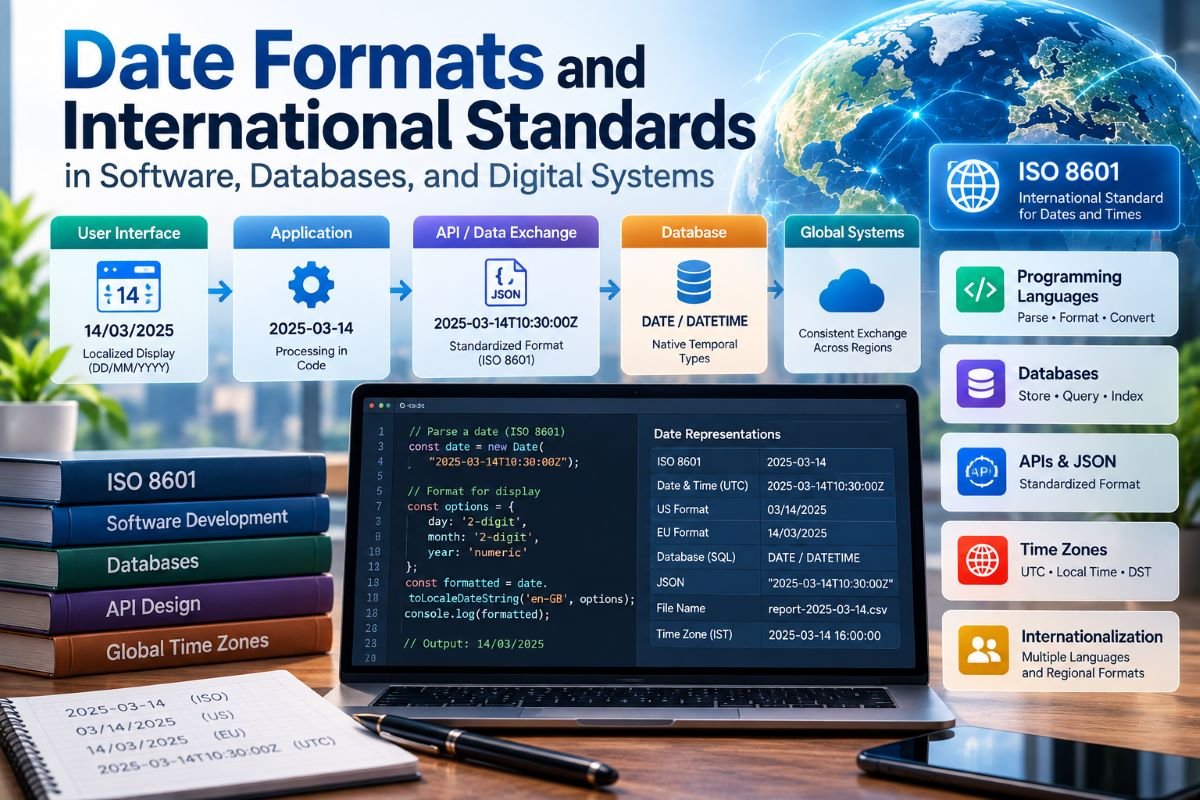
A user creates an account, an application records the registration date, a database stores the event, an API sends the information to another service, and a web interface displays it according to the user's region. Behind this apparently simple process, several layers of software may handle the same temporal information.
The date that a user sees on a screen is therefore not necessarily the same representation that the application stores or transmits.
A system may store a date as a native database value, serialize it into a standardized text representation for an API, convert it into a programming-language object, and finally display it using a localized format.
For example, the same underlying date may appear as:
YYYY-MM-DD
in a machine-readable interface and as:
DD/MM/YYYY
in a localized user interface.
Both representations can refer to the same calendar date.
This separation between data, representation, processing, and presentation is fundamental to modern software engineering.
International standards help systems communicate temporal information consistently, while database types, programming libraries, APIs, serialization formats, validation rules, and localization layers determine how that information behaves inside an application.
This article examines how date formats and international standards work within software, databases, APIs, file systems, cloud applications, and other digital environments.
Why Dates Are More Than Text in Software
A date may look like a string:
2026-09-26
but software should not automatically treat it as ordinary text.
A string is simply a sequence of characters.
A date represents structured temporal information.
That distinction matters because software may need to:
- compare dates
- sort records
- calculate intervals
- determine whether a date is before another date
- filter records by date range
- add or subtract time
- validate calendar values
- convert time zones
- generate reports
- synchronize events
- exchange data with other systems
If a date is stored only as arbitrary text, many of these operations become more difficult.
A properly structured temporal value allows the software to work with the meaning of the date rather than merely manipulating its characters.
The Four Layers of Digital Date Handling
A useful way to understand date processing is to divide it into four layers.
| User Interface |
| ↓ |
| Application Logic |
| ↓ |
| Data Exchange |
| ↓ |
| Database / Storage |
Each layer may use a different representation.
For example:
User display:
DD/MM/YYYY
Application:
Date object
API:
YYYY-MM-DD
Database:
Native DATE type
The underlying temporal value remains consistent even though the representation changes.
This architecture is especially important for international software because users from different regions may expect different date formats.
Storage Is Not the Same as Display
One of the most important principles in software date handling is:
the format used for storage does not have to be the format used for display.
Suppose a database stores a date using a native date type.
The application can retrieve that value and display it as:
DD/MM/YYYY
for one user and:
MM/DD/YYYY
for another.
The database does not need to store two separate versions of the date.
Instead:
| Database value |
| ↓ |
| Application |
| ↓ |
| Locale settings |
| ↓ |
| User display |
This separation reduces duplication and makes internationalization easier.
It also protects the underlying data from being tied to a particular visual convention.
Native Database Date Types
Most modern relational database systems provide specialized temporal data types.
Common categories include:
- date
- time
- datetime
- timestamp
- timestamp with time-zone semantics, depending on the database system
These types allow the database engine to understand that a value represents temporal information.
For example, a database may conceptually contain:
user_id
created_at
updated_at
birth_date
Here, birth_date and created_at may have different semantic meanings.
A birth date generally represents a calendar date.
A creation timestamp represents an event occurring at a particular time.
Treating both as generic strings would lose useful semantic information.
DATE, TIME, and DATETIME Are Different Concepts
Software systems often need to distinguish between several temporal concepts.
Date
A date identifies a calendar position.
Example:
YYYY-MM-DD
It does not necessarily identify a precise instant.
Time
A time identifies a position within a day.
Example:
HH:MM:SS
Date-Time
A date-time combines a calendar date with a time.
Example:
YYYY-MM-DD HH:MM:SS
Timestamp With Offset or Time-Zone Context
A more complete representation may include information about the relationship between local time and UTC.
For example:
YYYY-MM-DDTHH:MM:SS±HH:MM
These distinctions matter because software should not attach unnecessary assumptions to a temporal value.
A person's birth date is different from the exact instant at which a server recorded an event.
ISO 8601 and Digital Systems
International standards provide common conventions for representing dates and date-times.
ISO 8601 is particularly important in digital environments because it defines structured representations that can be interpreted consistently.
A familiar representation is:
YYYY-MM-DD
For date-time information, a representation can combine date and time components:
YYYY-MM-DDTHH:MM:SS
The value of standardized structures is that software systems do not have to rely entirely on local assumptions.
A year-first representation also has a practical advantage for machine processing because its component order is predictable.
Why YYYY-MM-DD Works Well in Software
The year-first structure is useful in many digital systems because the components progress from the largest calendar unit to the smallest:
Year → Month → Day
This ordering can be helpful for:
- sorting
- file names
- logs
- database exports
- reports
- API values
- scientific datasets
For example, values following:
YYYY-MM-DD
can naturally be ordered chronologically using ordinary lexical comparison when the representation is consistently zero-padded.
This does not mean that every software system should display dates this way to users.
It means that a predictable machine-readable representation can simplify data processing.
Date Formats in Programming Languages
Programming languages commonly provide date and time libraries.
These libraries typically provide operations for:
- parsing
- formatting
- comparison
- arithmetic
- time-zone conversion
- validation
- serialization
A common architecture is:
| Date String |
| ↓ |
| Parser |
| ↓ |
| Temporal Object |
| ↓ |
| Application Logic |
| ↓ |
| Formatter |
| ↓ |
| Output String |
This is safer than repeatedly manipulating date strings manually.
For example, an application can parse a known input format into a structured date object and then format that object for a particular destination.
The internal object becomes the bridge between different representations.
Parsing and Formatting Are Different Operations
Two concepts are especially important in software date handling.
Parsing
Parsing converts a representation into a structured temporal value.
| Text |
| ↓ |
| Parser |
| ↓ |
| Date Object |
Formatting
Formatting converts a structured temporal value into a representation.
| Date Object |
| ↓ |
| Formatter |
| ↓ |
| Text |
The distinction can be represented as:
Input → Parse → Process → Format → Output
This architecture is much more reliable than treating every date conversion as a text replacement.
Why Hard-Coded Date Parsing Causes Problems
A common software mistake is assuming that every incoming date follows one fixed pattern.
For example, an application may expect:
DD/MM/YYYY
while an external system sends:
MM/DD/YYYY
If the software interprets the input incorrectly, the resulting date may be wrong even though the input looks valid.
The most dangerous cases are dates where both day and month values fall within the valid range for either interpretation.
This is why software interfaces should define date formats explicitly.
API documentation, database schemas, import specifications, and form controls can all provide that context.
Date Formats in APIs
Modern applications rarely operate in isolation.
A website may communicate with:
- payment services
- authentication systems
- analytics platforms
- mobile applications
- cloud services
- partner APIs
- internal microservices
These systems frequently exchange temporal information.
For example:
{
"created_at": "YYYY-MM-DDTHH:MM:SSZ"
}
The receiving application needs to know what the representation means.
A documented and standardized representation reduces ambiguity.
APIs should ideally specify:
- whether the field is a date or date-time
- the expected format
- whether an offset is included
- whether UTC is required
- expected precision
- whether null values are allowed
- validation rules
A field called date alone may not provide enough information for a reliable integration.
Serialization of Temporal Data
Serialization means converting application data into a format suitable for storage or transmission.
Dates often need to be serialized when data moves between:
- backend and frontend
- server and mobile application
- microservices
- APIs
- queues
- files
- caches
A structured temporal object inside a programming environment may become a text representation during serialization.
Conceptually:
Application Date Object
| Application Date Object |
| ↓ |
| Serialization |
| ↓ |
| Standardized Date String |
| ↓ |
| Network |
| ↓ |
| Deserialization |
| ↓ |
| Date Object |
The receiving system then reconstructs the temporal value.
Consistent serialization rules are essential because different programming languages may represent dates internally in different ways.
JSON and Dates
JSON is widely used for data exchange, but JSON itself does not define a universal native date data type.
Applications therefore commonly represent dates and date-times as strings.
For example:
{
"event_date": "YYYY-MM-DD"}
or:
{
"event_time": "YYYY-MM-DDTHH:MM:SSZ"
}
The application contract must define what the string means.
This is an important software-engineering principle:
a date string becomes reliable when its representation and semantics are explicitly defined.
REST APIs and Temporal Consistency
In distributed systems, different services may be developed independently.
One service may be written in PHP.
Another may use JavaScript.
Another may use Python.
Another may use Java or another programming language.
Each environment has its own date libraries and internal representations.
A shared API contract provides a common temporal representation.
For example:
| Service A |
| ↓ |
| Standardized API date |
| ↓ |
| Service B |
The internal implementations can differ while the exchanged representation remains consistent.
This is one of the major practical benefits of international date standards.
Time Zones in Distributed Systems
Date handling becomes more complex when software operates across multiple locations.
A global application may have:
- users in different countries
- servers in multiple regions
- cloud services in different data centers
- databases shared across geographic locations
- devices reporting local times
If each component uses its own local clock representation without coordination, event ordering can become difficult.
A distributed system therefore often needs a consistent temporal reference for machine processing.
UTC is commonly used as a reference for many machine-to-machine operations.
Local time can then be derived for presentation.
Conceptually:
| Stored / exchanged instant |
| ↓ |
| UTC or normalized temporal representation |
| ↓ |
| User's time zone |
| ↓ |
| Localized display |
This approach separates global temporal consistency from regional presentation.
Why UTC and Local Time Should Not Be Confused
UTC and local time serve different purposes.
UTC provides a common reference.
Local time provides a representation appropriate to a particular geographic or regional context.
Suppose a server records an event using UTC.
A user interface can convert that instant to the user's local time zone.
The stored event does not need to change.
Only the presentation changes.
This architecture is particularly useful for:
- global applications
- calendars
- meeting systems
- travel services
- notification systems
- event scheduling
- server logs
Daylight-Saving Rules and Software
Time-zone conversion can become more complicated when regional clock rules change during part of the year.
A software system should therefore avoid treating a time-zone abbreviation as sufficient information in every situation.
A complete time-zone identifier can provide a richer set of rules.
This matters because an abbreviation may be ambiguous or may not describe all historical or future transitions.
For applications that schedule events or convert date-times, a proper time-zone database and time-zone-aware libraries are important.
The underlying principle is:
time-zone conversion requires rules, not just a fixed offset.
Database Indexing and Dates
Date fields are often used in database queries.
Examples include:
records created after a date
records updated within a range
events occurring during a period
users registered during a month
Properly typed temporal columns can support efficient querying and indexing.
For example, an application may need to retrieve:
all records between two temporal boundaries
A database can perform this operation efficiently when temporal information is stored in an appropriate data type and indexed appropriately.
By contrast, dates stored as inconsistently formatted strings may require additional parsing or conversion during queries.
Sorting Dates Correctly
Sorting is another reason representation matters.
Consider a day-first representation:
DD/MM/YYYY
Simple alphabetical sorting does not necessarily correspond to chronological order.
A year-first, fixed-width representation such as:
YYYY-MM-DD
has a useful property: lexical ordering can correspond to chronological ordering when all values use the same structure.
For example:
YYYY-MM-DD
YYYY-MM-DD
YYYY-MM-DD
can be ordered naturally by year, month, and day.
This makes standardized date representations useful in:
- logs
- file names
- exports
- archives
- data pipelines
Date Formats in File Names
Digital systems frequently include dates in file names.
Examples include:
report-YYYY-MM-DD
backup-YYYY-MM-DD
log-YYYY-MM-DD
A consistent year-first representation can make files easier to sort and organize.
For example, a directory containing files with standardized date prefixes can naturally group files chronologically.
This is a small design decision, but it becomes valuable when a system generates thousands or millions of files.
Date Formats in Logs
Logs are fundamentally temporal records.
A typical log entry may contain:
Timestamp
Service
Event
Status
Message
For example:
timestamp → event → response
A standardized timestamp representation allows logs from different services to be compared more easily.
This becomes especially important in distributed systems.
If multiple services record events using different temporal conventions, reconstructing the sequence of events can become difficult.
Consistent timestamps therefore support:
- debugging
- monitoring
- auditing
- security analysis
- incident investigation
- performance analysis
Event Ordering in Distributed Systems
Suppose three services generate events:
Service A → Event 1
Service B → Event 2
Service C → Event 3
If their timestamps use inconsistent interpretations, the apparent order may be incorrect.
A common temporal reference allows engineers to reconstruct the sequence more reliably.
However, timestamp synchronization itself can have limitations in distributed systems.
Network delays, clock differences, and processing delays can all affect event timing.
Therefore, timestamps are important evidence for event ordering, but distributed-system designs may require additional mechanisms when exact ordering is critical.
Date Validation in Software
Validation should happen at system boundaries.
Possible boundaries include:
- web forms
- API requests
- file imports
- database writes
- message queues
- external integrations
A validation process can check:
- expected representation
- required components
- valid ranges
- calendar validity
- time-zone information when required
- precision
- nullability
For example, a field documented as:
YYYY-MM-DD
should not silently accept an unrelated ambiguous representation unless the application explicitly supports it.
Strong validation prevents errors from spreading deeper into the system.
Input Validation vs Output Formatting
These are separate responsibilities.
Input Validation
Determines whether incoming data is acceptable.
Output Formatting
Determines how valid temporal data should be presented.
For example:
| Incoming API |
| ↓ |
| Validate |
| ↓ |
| Parse |
| ↓ |
| Internal Date |
| ↓ |
| Format |
| ↓ |
| User Interface |
Separating these responsibilities makes software easier to test and maintain.
Internationalization and Localization
International software must distinguish between internationalization and localization.
Internationalization prepares software to support multiple regions and conventions.
Localization adapts the interface to a particular locale.
Date handling is a classic example.
An internationalized application may have a common internal temporal model.
The localization layer then determines:
display order
separator
month name
weekday name
language
regional convention
This allows the same application to serve users with different date preferences without duplicating the underlying data.
User Interfaces Should Respect Regional Conventions
A global application should not necessarily force every user to see the same human-readable date format.
A user may expect:
DD/MM/YYYY
while another environment commonly uses:
MM/DD/YYYY
A localized interface can accommodate these differences.
However, machine-readable data should generally use an explicitly documented representation rather than relying on the user's regional preference.
This produces a useful distinction:
Machine-to-machine → standardized representation
Machine-to-human → localized representation
International Standards and Interoperability
Interoperability means different systems can exchange and interpret information consistently.
Date standards contribute directly to interoperability.
Without common conventions, two systems may disagree about:
- component order
- precision
- time-zone interpretation
- date-time separators
- calendar assumptions
- missing values
A standardized representation reduces these disagreements.
This is particularly important in large ecosystems where many independent systems communicate.
Microservices and Date Standards
Modern applications often use multiple services instead of a single monolithic application.
For example:
| User Service |
| ↓ |
| Order Service |
| ↓ |
| Payment Service |
| ↓ |
| Notification Service |
Each service may have its own database and implementation.
Temporal information can pass between these services through APIs or messaging systems.
If every service uses a different date convention, integration becomes unnecessarily complex.
A shared temporal contract can establish rules such as:
- date representation
- date-time representation
- UTC policy
- precision
- null handling
- serialization format
This allows individual services to remain internally flexible while maintaining a consistent external contract.
Cloud Systems and Temporal Data
Cloud applications often span multiple geographic regions.
A request may pass through:
| User Device |
| ↓ |
| CDN |
| ↓ |
| Application Server |
| ↓ |
| API |
| ↓ |
| Database |
| ↓ |
| Background Worker |
Several components may generate timestamps during one operation.
Consistent temporal handling helps engineers compare these events.
For example:
request received
request processed
database updated
response generated
can be analyzed using timestamps to estimate latency and identify delays.
In this environment, inconsistent time handling can make performance analysis much more difficult.
Date Formats in Data Warehouses
Large analytical systems often combine data from many sources.
One dataset may contain:
DD/MM/YYYY
while another contains:
YYYY-MM-DD
and another contains date-time values with offsets.
Before analysis, these datasets may need to be normalized.
A typical pipeline is:
| Source Data |
| ↓ |
| Ingestion |
| ↓ |
| Format Detection |
| ↓ |
| Validation |
| ↓ |
| Normalization |
| ↓ |
| Data Warehouse |
| ↓ |
| Analytics |
The goal is to create a consistent temporal model without losing important source information.
ETL and Date Transformation
ETL stands for:
Extract, Transform, Load.
Date conversion is often part of the transformation stage.
For example:
| Extract |
| ↓ |
| Source date |
| ↓ |
| Transform |
| ↓ |
| Validated normalized date |
| ↓ |
| Load |
| ↓ |
| Warehouse |
Transformation may involve:
- parsing
- format conversion
- time-zone normalization
- missing-value handling
- validation
- precision management
This makes date handling an important part of data engineering.
Date Formats in Scientific and Technical Data
Software systems used for science and engineering often require reproducible temporal data.
A dataset may combine measurements from several instruments.
If the instruments record dates differently, the data-processing pipeline must normalize the representations before comparison.
Standardized temporal formats can therefore support:
- reproducibility
- data sharing
- archival
- analysis
- interoperability
- long-term preservation
In these environments, a date is not merely something displayed on a screen. It is part of the scientific record.
Data Migration and Date Formats
Date problems frequently appear during migration between systems.
Imagine moving data from an older application into a new platform.
The old system may store dates as text while the new system expects native temporal values.
The migration process may need to:
| Old Format |
| ↓ |
| Parse |
| ↓ |
| Validate |
| ↓ |
| Convert |
| ↓ |
| New Temporal Type |
Migration scripts should be especially careful with ambiguous dates.
A migration that silently interprets an ambiguous value incorrectly can introduce errors across large datasets.
For this reason, migration processes should include validation reports and exception handling.
Backward Compatibility
Changing an API's date representation can affect existing clients.
Suppose an API previously returned:
YYYY-MM-DD
and a new version returns:
DD/MM/YYYY
Existing clients may fail if they expect the previous structure.
Date representations are therefore part of an API's contract.
When changing them, software teams may need:
- versioning
- migration documentation
- compatibility periods
- explicit schema changes
- client testing
This is an important reminder that date formats are not merely cosmetic details in software.
Precision and Fractional Seconds
Some digital systems require more precision than a simple date-time.
For example, logs from high-speed systems may include fractional seconds.
Conceptually:
YYYY-MM-DDTHH:MM:SS.sss
or a representation with even greater precision.
The required precision depends on the application.
A human calendar may need only a date.
A business application may need seconds.
A scientific or distributed system may require much finer precision.
The important rule is to choose a precision that matches the actual meaning and operational requirements of the data.
Dates and Security
Temporal data can also play a role in security systems.
Security logs may contain:
- login time
- authentication time
- password-change time
- session creation time
- token expiration time
- access time
If timestamps are incorrectly interpreted, security investigations can become difficult.
For example, analysts may reconstruct events in the wrong order.
Consistent timestamp handling therefore contributes to:
- auditing
- incident investigation
- access monitoring
- compliance records
- forensic analysis
The timestamp itself does not establish why an event occurred, but it provides an important temporal reference.
Dates in Scheduling Systems
Calendar and scheduling applications have particularly complex temporal requirements.
A scheduling system may need to distinguish between:
- a calendar date
- a local wall-clock time
- a specific instant
- a recurring event
- a time-zone rule
For example, an event scheduled for a particular local time should not necessarily be stored as a simple date string.
The system needs enough temporal context to determine what the event means.
This is why professional scheduling systems rely on structured temporal models rather than simple string manipulation.
The Difference Between a Date and an Instant
This distinction is central to reliable software design.
A date identifies a calendar day.
An instant identifies a specific point on a global timeline.
For example:
YYYY-MM-DDTHH:MM:SS.sss
YYYY-MM-DD
does not necessarily identify one exact instant.
A timestamp with time and offset can identify an instant more precisely.
Therefore, software developers should ask:
Does this field represent a calendar date, a local date-time, or an exact instant?
The answer determines which temporal type and conversion rules should be used.
Common Software Mistakes With Dates
Several recurring mistakes can create serious problems.
Storing Dates as Arbitrary Strings
This makes validation and comparison harder.
Mixing Date and Date-Time Semantics
A calendar date should not automatically be treated as an exact instant.
Ignoring Time Zones
Global systems can produce incorrect local dates and times.
Using Locale-Specific Values in APIs
Machine interfaces should not depend on the user's display preferences.
Hard-Coding Formats
Applications become difficult to internationalize.
Parsing Without Validation
Structurally correct strings can still represent invalid dates.
Losing Precision
Converting a timestamp to a date can discard important information.
Changing API Date Formats Without Versioning
Existing clients may fail.
Assuming Timestamps Prove Exact Event Order
Distributed systems can have clock and network-related complications.
A Robust Architecture for Date Handling
A well-designed digital system can use the following architecture:
| External Input |
| ↓ |
| Format Identification |
| ↓ |
| Validation |
| ↓ |
| Parsing |
| ↓ |
| Normalized Temporal Model |
| ↓ |
| Application Logic |
| ↓ |
| Storage / API Serialization |
| ↓ |
| Localization |
| ↓ |
| User Display |
This architecture keeps different concerns separate.
The database does not need to know the user's preferred visual format.
The user interface does not need to know how the database internally represents the value.
The API can define a stable machine-readable contract.
The application logic can operate on structured temporal objects.
Each layer performs a specific role.
Best Practices for Developers
Developers working with dates and international standards can follow several principles.
Define Temporal Semantics
Clearly state whether a field represents:
- date
- time
- local date-time
- instant
- duration
- recurring schedule
Use Native Temporal Types
When supported, prefer database and programming-language temporal types over arbitrary strings.
Define API Contracts
Document exact date and date-time representations.
Normalize Carefully
Use a consistent internal representation while preserving necessary source information.
Separate Storage From Presentation
Do not store a date merely in the format required by one user interface.
Use Time-Zone-Aware Libraries
Avoid implementing complex time-zone rules manually.
Validate at Boundaries
Check external input before it enters core application logic.
Preserve Precision
Do not discard time or offset information unless the application intentionally requires it.
Test International Cases
Date handling should be tested across locales, time zones, ambiguous inputs, and boundary conditions.
Testing Date Logic
Date-related software should be tested more extensively than simple examples might suggest.
Useful test categories include:
- valid dates
- invalid dates
- ambiguous formats
- different locales
- date boundaries
- time-zone changes
- date-time conversions
- missing values
- leap-day behavior
- database round trips
- API serialization
- deserialization
- precision changes
A date library may correctly handle many complex rules, but application code can still misuse the library.
Testing therefore remains essential.
Why Standardization Matters More as Systems Grow
A small application may appear to function without strict temporal standards.
As the system grows, however, more components begin interacting.
| Website |
| ↓ |
| API |
| ↓ |
| Database |
| ↓ |
| Analytics |
| ↓ |
| Mobile App |
| ↓ |
| External Services |
Each new connection creates another opportunity for date-format disagreement.
Standardization reduces this complexity.
Instead of defining a unique date interpretation for every connection, the system can establish a common temporal contract.
This is one reason international standards become increasingly valuable in large digital ecosystems.
The Future of Digital Date Handling
Digital systems are becoming increasingly distributed.
Applications now combine:
- cloud services
- mobile devices
- APIs
- databases
- IoT devices
- analytics platforms
- artificial intelligence systems
- international users
All of these systems depend on temporal information.
As data moves between more systems, reliable date handling becomes increasingly important.
Future applications will likely continue to separate:
Machine representation
from:
Human presentation
while relying on standardized temporal structures for interoperability.
The central challenge will remain the same:
preserve the meaning of time while allowing different systems and users to represent it appropriately.
Key Takeaways
Date formats are an important part of digital system architecture, not merely a visual design choice.
The main principles are:
- A date should be treated as structured temporal data rather than ordinary text.
- Storage and display formats can be different.
- Native database temporal types are generally preferable to arbitrary date strings.
- Parsing converts representations into structured temporal values.
- Formatting converts temporal values into representations.
- ISO 8601 provides important standardized representations for digital data exchange.
- APIs should explicitly document date and date-time formats.
- JSON requires applications to define how dates are represented.
- UTC and time-zone-aware processing are important in distributed systems.
- Localized display should be separated from machine-readable data.
- Date fields should be validated at system boundaries.
- Temporal semantics should distinguish dates, local date-times, and exact instants.
- Database indexing and standardized representations can improve temporal queries and sorting.
- Data migration and ETL pipelines require careful date normalization.
- Changing an API's date format can be a compatibility issue.
- Precision should be preserved when the application requires it.
- Testing international and time-zone scenarios is essential.
- International standards improve interoperability as digital systems become more interconnected.
Frequently Asked Questions
Why are date formats important in software?
Date formats determine how temporal information is interpreted, exchanged, stored, and displayed. An inconsistent format can lead to ambiguity or incorrect data processing.
Should dates be stored as strings in a database?
When a database provides native temporal data types, they are generally preferable for structured date information because they support validation, comparison, sorting, and temporal queries more naturally.
Is ISO 8601 useful for APIs?
Yes. Its standardized representations can provide a predictable way to exchange date and date-time information between different systems.
Should an API use the user's local date format?
Generally, an API should use a clearly documented machine-readable representation rather than changing its structure according to the user's display preference.
Why should storage and display formats be separate?
Separating them allows the same underlying temporal value to be displayed according to different regional conventions without duplicating or altering the stored data.
What is the difference between a date and a timestamp?
A date identifies a calendar day, while a timestamp generally represents a more precise temporal point and may include time-zone or UTC-offset information.
Why is UTC useful in distributed systems?
UTC provides a common temporal reference that can help systems operating across different regions compare and exchange event times consistently.
Can time-zone conversion change a date?
Yes. When an exact instant is converted between time zones, the local calendar date can move to the previous or following day.
Why are dates important in server logs?
Logs use timestamps to establish when events were recorded. Consistent temporal representation helps developers compare events across services and investigate system behavior.
How do databases sort dates?
When dates are stored using appropriate temporal data types, the database can compare them according to their temporal meaning. Certain standardized text representations can also sort chronologically when their structure is consistent.
What happens when a date format changes in an API?
Existing clients may fail if they expect the previous representation. Date formats should therefore be treated as part of the API contract.
Why is date validation important?
A value can match the expected character pattern while still representing an invalid calendar date. Validation helps prevent incorrect temporal information from entering the system.
What is date serialization?
Serialization converts an application's temporal value into a representation suitable for storage or transmission. The receiving system can then deserialize it back into a structured temporal value.
Why are time zones difficult for software?
Time zones are governed by geographic and regional rules rather than simply fixed offsets. Software may need specialized time-zone data and libraries to correctly interpret local times.
Can one date format work for every user?
A single machine-readable representation can be used consistently across systems, but human-facing interfaces may need localized formats appropriate to different users and regions.
Final Perspective
Date formats are a small but fundamental part of digital infrastructure.
A date entered by a user can travel through a web application, programming language, API, database, message queue, analytics platform, and external service before it is finally displayed somewhere else.
At every stage, the system must preserve the temporal meaning of the information.
The most reliable approach is to separate the responsibilities:
| Input |
| ↓ |
| Validation |
| ↓ |
| Parsing |
| ↓ |
| Structured Temporal Value |
| ↓ |
| Application Processing |
| ↓ |
| Storage / Exchange |
| ↓ |
| Localization |
| ↓ |
| Display |
International standards provide a common foundation for this process, while programming languages, databases, APIs, and localization systems provide the mechanisms needed to implement it.
The important lesson is that date formatting is not merely about how a date looks.
In software, a date is data.
Its format influences interoperability, its type influences how it can be processed, its time-zone context can influence its meaning, and its representation can determine whether different systems understand the same temporal information in the same way.
As digital systems become more interconnected, reliable date handling will remain an essential part of software engineering, data management, and global information exchange.
Comments
No comments yet.