Introduction
Calendars are essential to modern digital systems. Every time a user schedules a meeting, a database records an order, an application calculates an age, or a server processes a timestamp, software must interpret and manipulate dates correctly. These operations may appear simple, but they depend on a collection of mathematical rules involving calendar years, month lengths, leap days, elapsed time, and time-zone differences.
Calendar mathematics in software is the practical application of these rules to digital representations of time. It enables applications to determine whether a date is valid, calculate the interval between two dates, identify weekdays, schedule future events, and convert timestamps into local calendar dates.
The challenge is that digital systems must represent both regular and irregular aspects of time. Computers work efficiently with numerical values, yet calendar months have different lengths, years contain different numbers of days, and local time can change according to time-zone legislation. A value representing a particular instant is not necessarily the same thing as a calendar date displayed to a user.
Database systems introduce additional considerations. A column may store a date without a time, a local date-time without a time zone, or a timestamp representing an instant. Choosing the wrong data type can create errors when records are compared, sorted, transferred, or displayed in another region.
Understanding these relationships is important for developers, database administrators, data analysts, and anyone building applications that depend on accurate date calculations. It also explains why reliable digital calendars require more than adding a fixed number of seconds or treating every month as an equal interval.
1. How Computers Represent Dates and Time
A computer cannot interpret a date in the same way a person does unless the date is converted into a defined representation. Software therefore uses structured fields, numerical counts, or encoded timestamps to represent time.
1.1 Calendar-based representation
A conventional date can be represented using three components:
- Year
- Month
- Day
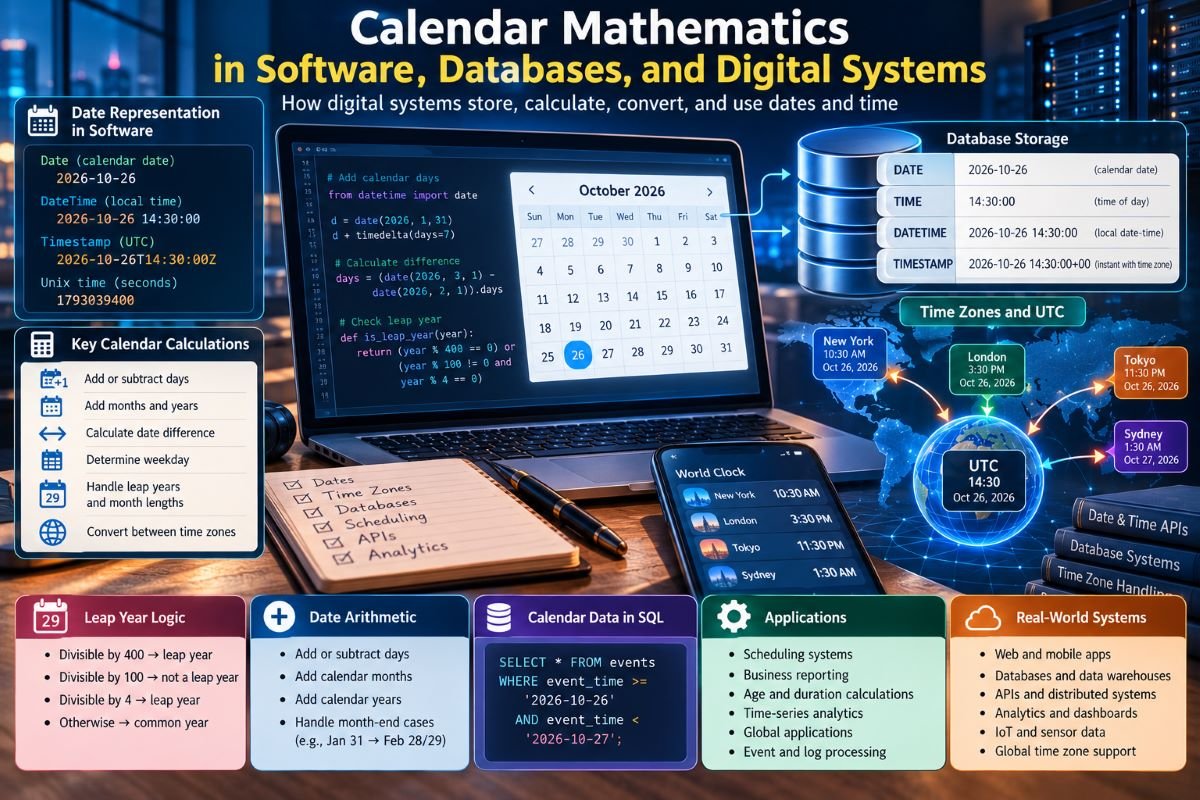
For example, 2026-10-26 represents 26 October 2026 in the Gregorian calendar when that calendar is explicitly understood.
This representation is useful for birthdays, holidays, reporting dates, and other events associated with a calendar day rather than a precise moment.
The order of components matters. A date such as 04/05/2026 may represent April 5 or 4 May depending on the regional format. Software should use an unambiguous representation when dates are exchanged between systems.
1.2 Time-based representation
A time value may contain hours, minutes, seconds, and fractions of a second. When combined with a date, it forms a date-time value.
For example:
2026-10-26 14:30:00
This identifies a local date and clock time, but it does not by itself establish a unique global instant unless the relevant time-zone or offset information is known.
The same local date-time can occur in different places simultaneously, and some local times can be ambiguous during daylight saving transitions.
1.3 Numerical representations
Many systems represent time using a count of units measured from a reference point, called an epoch.
A timestamp might count seconds or milliseconds since that epoch. Such representations make it straightforward to compare instants, calculate elapsed durations, and sort events chronologically.
However, an epoch-based value is not a complete replacement for calendar rules. Software still needs calendar and time-zone information to turn a numerical timestamp into a human-readable local date.
2. The Difference Between Dates, Durations, and Instants
One of the most important principles in digital timekeeping is that a date, a duration, and an instant are different concepts.
2.1 Calendar dates
A calendar date identifies a particular day in a calendar system. A birthday, public holiday, or accounting date may be represented this way.
A date-only value does not necessarily require a time zone because it describes a calendar day rather than a specific moment.
For example, a birthday stored as 1995-07-18 should not automatically change to the previous day when a user views it from another country.
2.2 Durations
A duration measures how much time separates two points. It may be expressed in seconds, minutes, hours, or days.
For two timestamp values (t_1) and (t_2), the elapsed duration is:
[\Delta t=t_2-t_1]
If two instants are separated by 86,400 seconds, exactly 24 hours have elapsed under the relevant timestamp convention.
However, this does not always mean that one local calendar day has passed. A local day affected by a daylight saving transition can be shorter or longer than 24 hours.
2.3 Instants
An instant represents a particular point on the timeline. Systems commonly use UTC-based timestamps or another defined time standard to identify instants consistently.
For example, an online meeting scheduled for a particular instant should occur at the same moment for every participant, even though each participant may see a different local clock time and date.
2.4 Why the distinction matters
Confusing these concepts creates common software defects. Adding 24 hours to a timestamp is not always equivalent to moving to the next local calendar day. Similarly, adding one calendar month is not equivalent to adding a fixed number of seconds.
Reliable software should use the representation that matches the intended operation.
3. How Calendar Mathematics Works in Date Calculations
Date arithmetic applies calendar rules to calculate new dates or compare existing ones.
Unlike ordinary arithmetic, calendar arithmetic must account for varying month lengths, leap years, and the boundaries between years.
3.1 Adding calendar days
Adding a fixed number of calendar days means advancing through consecutive dates.
For example, adding seven calendar days to 26 October produces 2 November in the Gregorian calendar. The calculation crosses the end of October, but the interval remains seven days.
Software libraries typically handle this operation by applying the relevant calendar rules rather than requiring developers to calculate every month boundary manually.
3.2 Adding calendar months
Adding one calendar month is a different operation.
Consider 31 January. February does not contain a thirty-first day. A software library must therefore follow a defined policy when adding one month to this date.
Depending on the library and application, the result might be adjusted to the last day of February or handled according to another documented convention.
There is no universal behavior that every programming language automatically uses. Developers should verify the rules of the date library they choose.
3.3 Adding calendar years
Adding one year to a date generally attempts to preserve its month and day. However, a date such as 29 February does not exist in every year.
A calendar application must define what happens when the target year is not a leap year. Different applications may use different conventions, so the behavior should be deliberate and tested.
3.4 Calculating the number of days between dates
Software can calculate the difference between two dates by converting them into a common day-count representation or by using a calendar-aware library.
If two dates correspond to consecutive day numbers (D_1) and (D_2), the elapsed-day difference is:
[\Delta D=D_2-D_1]
This method handles month and year boundaries when the underlying conversion is correct.
The result must still be interpreted carefully. The elapsed interval between 1 June and 5 June is four days, while a list including both endpoint dates contains five calendar dates.
4. Leap-Year Rules in Digital Systems
Leap-year logic is a fundamental requirement for Gregorian calendar software.
The Gregorian calendar uses the following rule:
- A year divisible by 400 is a leap year.
- A year divisible by 100 but not by 400 is a common year.
- Other years divisible by 4 are leap years.
- Remaining years are common years.
In a programming language that supports a remainder operator, the rule can be expressed as:
isLeapYear(year):
    if year % 400 == 0:
        return true
    if year % 100 == 0:
        return false
    return year % 4 == 0
This is illustrative pseudocode; the exact syntax varies by language.
4.1 Why the rule is necessary
A common Gregorian year contains 365 days, while a leap year contains 366. The extra day helps keep the calendar aligned with the seasonal year.
Without the century exceptions, the calendar would insert slightly too many leap days over long periods.
4.2 Why developers should use tested libraries
Although the rule is straightforward, date handling involves additional concerns, including supported year ranges, historical calendar conventions, and language-specific date APIs.
For ordinary application development, using a well-tested calendar library is generally safer than writing a custom date engine.
Custom implementations may still be necessary in specialized environments, but they should be tested against known leap-year cases and month-boundary conditions.
5. Calendar Mathematics in Databases
Databases store and retrieve dates used by websites, business applications, scheduling systems, and analytics platforms.
Choosing the correct column type is essential because different types represent different kinds of temporal information.
5.1 Date-only columns
A date-only column is suitable for values such as birthdays, publication dates, billing dates, and event dates that do not require a time of day.
For example, a database might store a blog publication date as:
published_date DATEThis represents a calendar date rather than a specific instant.
A date-only field should not be treated as though it automatically represents midnight UTC or local midnight unless the application explicitly defines that convention.
5.2 Time-only columns
A time-only column stores a clock time without necessarily including a date.
Examples include a store's daily opening time or a recurring meeting's start time.
A time such as 09:30:00 does not identify a unique moment by itself. It must be combined with a date and, when needed, a time zone to determine when an event actually occurs.
5.3 Date-time columns
A date-time column can store a calendar date and clock time together. Its precise behavior depends on the database engine and data type.
Some date-time types do not retain time-zone information. If the application stores a local date-time without recording its time zone, the value may become ambiguous when transferred between regions.
5.4 Timestamp columns
The word timestamp does not mean exactly the same thing in every database system.
For example, MySQL's TIMESTAMP type uses time-zone conversion behavior involving the session time zone, whereas MySQL's DATETIME type represents a date and time without that same automatic conversion behavior.
PostgreSQL offers timestamp without time zone and timestamp with time zone types. The latter represents an instant and normalizes time-zone-aware input, but it does not preserve the original named time zone as part of the stored value.
Developers should consult the documentation for their database engine instead of assuming that identically named types behave identically across platforms.
5.5 Choosing the right type
| Requirement | Appropriate representation |
| Birthday or holiday | Date-only value |
| Daily opening time | Time-only value |
| Local appointment requiring a specific region | Local date-time plus a named time zone |
| A precise event shared across regions | Instant or time-zone-aware timestamp |
| Recurring local event | Local schedule, time zone, and recurrence rules |
The central rule is to store the meaning of the value, not merely its visible format.
6. UTC, Time Zones, and Calendar Conversion
Digital systems frequently exchange timestamps across different regions. Coordinated Universal Time (UTC) provides a common reference for representing instants, while time-zone rules determine how those instants appear as local clock times.
6.1 Converting UTC to local time
A simplified conversion adds the applicable offset to UTC. However, the offset can depend on the date because some regions observe daylight saving time or change their legal time-zone rules.
A reliable application should use a maintained time-zone database rather than assuming a location always has a fixed UTC offset.
6.2 Named time zones
A named time zone, such as America/New_York or Europe/London, represents a collection of rules for interpreting local time.
A fixed offset such as UTC−05:00 does not capture every historical or future rule associated with a location.
When scheduling future events, retaining the intended named time zone can be important because the offset applicable on the event date may change.
6.3 Daylight saving transitions
When clocks move forward, some local clock times do not occur. When clocks move backward, some local times occur twice.
For example, a local appointment scheduled during a repeated hour may be ambiguous unless the application specifies which occurrence is intended.
Software must decide how to handle nonexistent or ambiguous local date-times. The appropriate behavior depends on the application's purpose and the rules of the selected date-time library.
6.4 Date changes across time zones
The same instant may fall on different calendar dates in different regions.
A meeting held near midnight UTC might occur on the following local date in one location and the previous local date in another.
A calendar application must convert the instant into each participant's local representation rather than changing only the displayed hour.
7. Unix Time, Epochs, and Numerical Timestamps
Many systems represent time as a numerical count measured from a defined reference point.
Unix time is a familiar example. Conventionally, it counts seconds from 1970-01-01 at 00:00:00 UTC, with technical details concerning leap seconds and implementation conventions.
Some applications use milliseconds or microseconds instead of seconds.
7.1 Why numerical timestamps are useful
Numerical timestamps simplify several operations:
- Comparing event instants.
- Sorting records chronologically.
- Measuring elapsed time.
- Transferring event times between systems.
- Supporting time-based analytics.
For two timestamps using the same unit and compatible convention, subtraction gives the difference in that unit.
7.2 Converting a timestamp to a calendar date
A timestamp does not directly contain a human-readable year, month, and day. Software converts it using calendar rules and the desired time zone.
The same timestamp can therefore produce different local date-time representations in different regions.
7.3 Precision and unit errors
A common programming error occurs when a timestamp in milliseconds is mistakenly interpreted as seconds, or vice versa. This can produce a date far removed from the intended one.
Applications should document timestamp units and use clear variable names or strongly typed representations where possible.
7.4 Leap seconds and time standards
Civil calendars, UTC, Unix time, and physical time measurements are related but distinct concepts. Leap seconds have historically been used in UTC to keep it close to Earth-rotation time, while many computing timestamp conventions do not represent them as ordinary consecutive seconds.
Systems requiring high-precision scientific or astronomical timing must understand the time scale and leap-second policy used by their data source.
For ordinary business applications, standard date-time libraries usually handle common civil-time requirements, but scientific systems may need more specialized tools.
8. How Software Determines Weekdays and Calendar Patterns
Applications often need to determine the weekday associated with a date. This supports calendar interfaces, recurring schedules, payroll systems, and reporting tools.
8.1 The seven-day cycle
The Gregorian calendar uses a seven-day week. A common year contains 365 days:
[365=52\times7+1]
A leap year contains 366 days:
[366=52\times7+2]
These remainders explain why the weekday at the start of the next year shifts by one day after a common year and two days after a leap year.
8.2 Modular arithmetic
Modular arithmetic allows software to work with repeating weekday patterns using remainders.
For example:
[100\bmod7=2]
A period of 100 elapsed days contains 14 complete weeks and two extra days. If the starting weekday is Monday, the resulting weekday is Wednesday.
Practical software usually relies on tested date-time libraries for weekday determination, but the underlying mathematics remains useful for understanding and validating results.
8.3 Repeating calendar layouts
The Gregorian calendar has a 400-year cycle containing 146,097 days, which is exactly divisible by seven.
This mathematical property means the calendar's weekday arrangement repeats after 400 years under uninterrupted Gregorian rules.
The cycle can support calendar testing and analysis, although application developers rarely need to implement the entire cycle manually.
9. Calendar Calculations in SQL Queries
SQL provides operations for comparing dates, extracting components, calculating intervals, and grouping records by time periods. The available functions and their behavior depend on the database engine.
9.1 Filtering by date range
Suppose a database stores event timestamps and an application needs records for a particular day.
A common approach is to use a start boundary and an exclusive end boundary:
SELECT *
FROM events
WHERE event_time >= :start_time
  AND event_time < :end_time;
The parameters should represent the correct boundaries in the same temporal convention as the stored data.
Using an exclusive upper bound avoids problems associated with guessing the final fractional second of a day. It also works well when timestamp precision varies.
9.2 Grouping by calendar day
Analytics systems often aggregate events by day, month, or year.
However, the meaning of a day must be clear. Grouping UTC timestamps by their UTC date produces different results from grouping the same events by local business date.
A report for a store in a particular time zone should generally convert or interpret timestamps according to the intended business calendar before grouping.
9.3 Calculating intervals
Databases provide date-difference and interval operations, but these are not always interchangeable across database engines.
An elapsed duration between two instants is different from a count of calendar boundaries crossed. A report that counts months between dates may therefore produce a different result from one that divides elapsed seconds by an average month length.
The query should reflect the business definition of the requested interval.
9.4 Indexing date fields
Date and timestamp columns are often used in range filters. Appropriate indexes can improve query performance when applications frequently retrieve records within particular time intervals.
Developers should also consider how functions applied to indexed columns affect query plans. In some cases, using explicit range boundaries allows the database to use an index more efficiently.
10. Date and Time in APIs and Distributed Systems
Digital systems exchange date-time information through APIs, message queues, logs, and event streams.
A value that is interpreted differently by the sender and receiver can produce subtle errors, even when the transmitted text appears valid.
10.1 Standardized date formats
ISO 8601 provides widely used formats for representing dates and date-times. A date such as 2026-10-26 is less ambiguous than a numeric format whose component order varies by region.
A date-time that includes a UTC marker or explicit offset carries more information about the instant it represents.
However, a local date-time without an offset remains dependent on external context.
10.2 Event timestamps
Distributed applications may generate events on servers in different regions. Using a consistent time standard makes it easier to compare their timestamps and reconstruct event order.
Clock synchronization errors can still occur, so a timestamp alone does not always establish the exact causal order of events in a distributed system.
Applications that require strict ordering may also use sequence numbers, logical clocks, or other mechanisms.
10.3 Recurring events
A recurring meeting at 9:00 AM every Monday is not equivalent to repeating an instant every seven times 24 hours.
The former is a local calendar rule. The latter is a fixed-duration repetition.
If the intended meeting time should remain 9:00 AM in a particular region, the application should preserve the local time, named time zone, and recurrence rule. It can then calculate each occurrence using the rules applicable to that date.
11. Calendar Mathematics in Data Analytics
Analytics systems summarize events over days, weeks, months, quarters, and years. Calendar mathematics determines which records belong to each reporting period.
11.1 Calendar periods versus rolling periods
A calendar month runs from the beginning to the end of a named month. A rolling 30-day window contains 30 days counted relative to a chosen reference point.
These periods can produce different totals. For example, a calendar month can contain 28, 29, 30, or 31 days.
Reports should clearly state which definition is used.
11.2 Fiscal calendars
Businesses do not always organize reporting around the Gregorian calendar year. Some use fiscal years that begin in a different month, while others use specialized week-based calendars.
Software must apply the organization's reporting rules rather than assuming that every annual report runs from January through December.
11.3 Time-series aggregation
When records are grouped into hourly or daily buckets, the system must decide how boundaries are defined and how missing intervals are represented.
A bucket containing no events may represent genuine inactivity, a data-collection outage, or an interval outside the collection schedule.
Those cases should not automatically be treated as equivalent.
11.4 Reproducibility
Analytical results should be reproducible even when time-zone databases, reporting rules, or source records change.
Recording the applicable reporting conventions and data-processing assumptions helps analysts explain why results may differ across versions or reporting dates.
12. Common Calendar Bugs in Software
Date-related defects often arise from assumptions that work for ordinary dates but fail at boundaries.
Ignoring leap years: Code that assumes every year has 365 days may calculate incorrect intervals around 29 February.
Assuming months are equal: Treating each month as 30 days produces incorrect calendar-month operations and some reporting calculations.
Using ambiguous date formats: A numeric date can be interpreted differently across regional settings.
Mixing local and UTC values: Comparing a local date-time directly with a UTC timestamp without conversion can produce incorrect results.
Losing time-zone information: Storing a local appointment without its intended region may make it impossible to reconstruct the intended instant reliably.
Confusing timestamps and durations: A timestamp identifies a point under a defined convention, while a duration measures the difference between points.
Ignoring daylight saving transitions: Adding a fixed number of hours may not preserve a desired local appointment time.
Using the wrong timestamp unit: Interpreting milliseconds as seconds can create drastically incorrect dates.
Assuming all databases behave alike: Similar data-type names can have different semantics across database engines.
Preventing these defects requires precise data modeling, documented assumptions, and tests that cover unusual calendar conditions.
13. Best Practices for Developers and Database Administrators
Reliable digital timekeeping begins with selecting representations that match the intended meaning of the data.
13.1 Define the temporal meaning
Before selecting a database column or programming-language type, determine whether the value represents a date, a local date-time, an instant, a recurring schedule, or an elapsed duration.
This decision influences storage, comparison, conversion, and display behavior.
13.2 Use established libraries
Well-tested date-time libraries provide calendar operations, leap-year handling, date parsing, and time-zone conversion.
Using these libraries reduces the risk of implementing complex edge cases incorrectly. Developers should still understand the library's documented behavior, especially for month arithmetic and ambiguous local times.
13.3 Preserve named time zones when needed
For recurring appointments and future schedules, store the intended named time zone when the local region matters.
A fixed offset alone may not preserve the intended local clock time after a time-zone rule changes.
13.4 Use explicit formats at system boundaries
APIs, database interfaces, and import pipelines should use documented date formats and timestamp units.
Ambiguous strings and implicit local-time assumptions should be avoided.
13.5 Test boundary conditions
Automated tests should include leap days, the end of each month, year transitions, daylight saving changes, and timestamp precision boundaries.
Tests should also verify the behavior of the actual database and programming-language libraries used by the application.
13.6 Document business rules
Applications should specify whether calculations use elapsed days, inclusive calendar dates, working days, calendar months, or fixed durations.
Clear definitions help prevent disagreements between developers, analysts, and users.
14. The Future of Calendar Mathematics in Digital Systems
Digital systems increasingly process data from distributed applications, connected devices, international teams, and automated services. These environments make consistent temporal interpretation more important.
Modern systems must handle events arriving out of order, records with different sampling frequencies, historical time-zone changes, and recurring schedules that extend into the future.
Improved date-time libraries, standardized representations, stronger database types, and automated testing can reduce errors. However, no data type or library can replace the need to understand the meaning of the time value being stored.
Artificial intelligence and analytics also depend on correct temporal preprocessing. A forecasting model trained on incorrectly aligned timestamps may learn misleading relationships, regardless of its complexity.
The long-term goal is not merely to store dates in a consistent format. It is to preserve the relationship between calendar labels, actual instants, local rules, and the operations an application needs to perform.
Conclusion
Calendar mathematics provides the rules that allow software, databases, and digital systems to handle dates and time consistently. It supports date arithmetic, timestamp conversion, database queries, recurring schedules, reporting periods, distributed event processing, and time-series analytics.
The most important distinction is between calendar dates, local date-times, instants, and durations. Each represents a different concept and requires appropriate rules. Leap years and variable month lengths affect calendar calculations, while time zones and daylight saving transitions influence the conversion of instants into local representations.
Reliable applications use suitable data types, standardized formats, established date-time libraries, explicit business rules, and tests for calendar boundaries. They also preserve time-zone information when the original local context matters.
By treating time as structured data rather than a collection of interchangeable strings and numbers, developers can build systems that calculate dates correctly, interpret events consistently, and remain dependable across regions and calendar conditions.
Frequently Asked Questions
What is calendar mathematics in software?
Calendar mathematics in software is the application of date and time rules to digital operations such as calculating intervals, determining weekdays, validating dates, scheduling events, and converting timestamps.
What is the difference between a date and a timestamp?
A date identifies a calendar day. A timestamp generally represents a time-related numerical value or a date-time under a defined convention. Whether it identifies a unique instant depends on its format and associated time-zone information.
Why should databases distinguish dates from timestamps?
A birthday or publication date may need only a calendar date, while a meeting or transaction may require a precise instant. Using the appropriate data type helps prevent unwanted time-zone conversion and ambiguous interpretations.
Why is UTC commonly used in digital systems?
UTC provides a common reference for representing instants across different regions. Systems can convert these instants into local times using the relevant time-zone rules.
How do databases handle leap years?
Database date functions and supported date types generally apply calendar rules when parsing, storing, and calculating dates. Developers should verify the behavior of their particular database engine and avoid replacing built-in calendar operations with untested assumptions.
Why can adding one month produce unexpected results?
Months have different lengths. When a date such as 31 January is moved forward by one month, February has no corresponding thirty-first day. The result depends on the rules of the programming language or date-time library.
How should recurring meetings be stored?
A recurring meeting that must remain at a particular local clock time should generally preserve its local time, named time zone, and recurrence rule. Each occurrence can then be calculated using the applicable calendar and time-zone rules.
What are common date-related programming errors?
Common errors include mishandling leap years, confusing date-only values with timestamps, assuming every month has 30 days, mixing local time with UTC, losing time-zone information, and interpreting timestamp units incorrectly.
Comments
No comments yet.