Introduction
Managing a calendar may seem like a straightforward activity, but organizing appointments, coordinating meetings, remembering deadlines, and balancing personal commitments can become increasingly complicated as schedules grow. People often spend considerable time checking availability, comparing meeting times, adjusting appointments, and responding to scheduling requests. These repetitive activities create an opportunity for artificial intelligence to make calendar management more efficient.
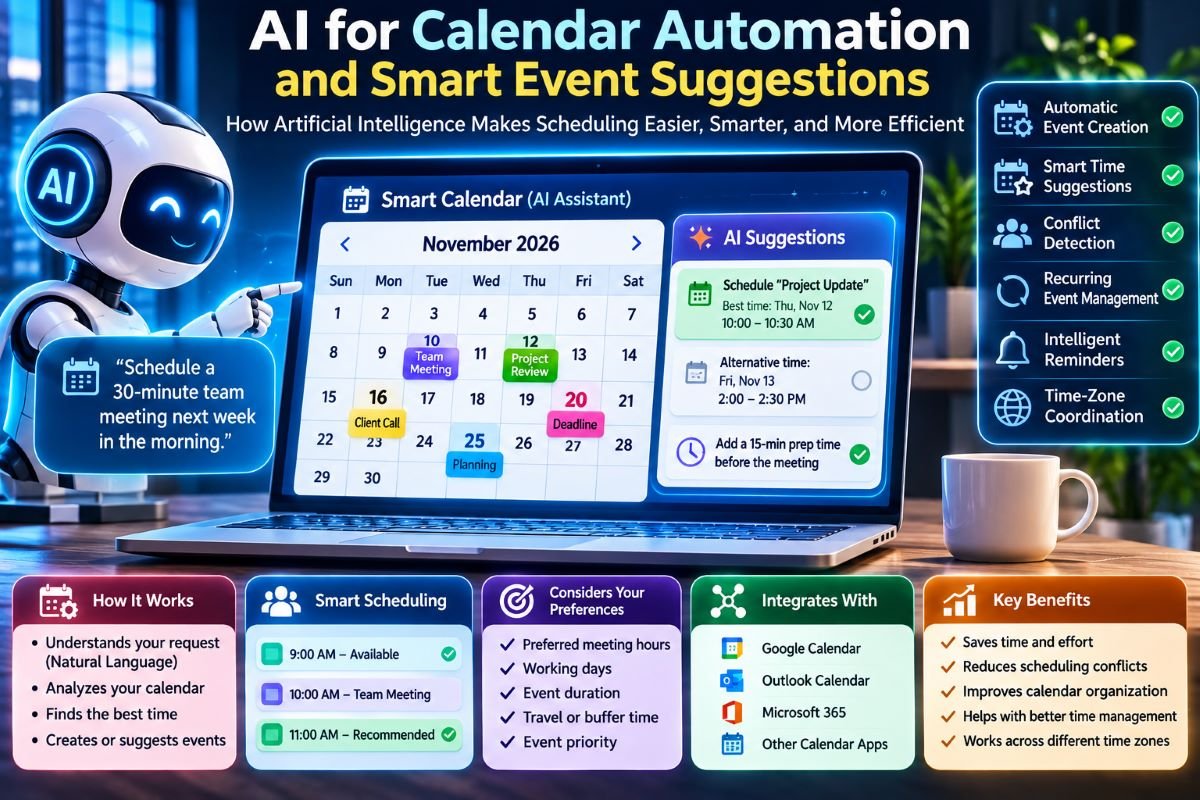
AI for calendar automation uses intelligent algorithms to understand scheduling information, identify patterns, process event details, and assist with decisions about when and how activities should be organized. Instead of requiring users to manage every calendar entry manually, AI-powered systems can recommend suitable meeting times, identify potential conflicts, generate event details, and suggest adjustments based on availability and preferences.
Smart event suggestions extend this capability by considering more than an empty time slot. An intelligent calendar may evaluate meeting duration, participant availability, recurring commitments, working hours, travel requirements, and the importance of an event before recommending a schedule.
The technology combines natural language processing, machine learning, optimization algorithms, calendar integrations, and time-zone calculations. These components allow digital assistants to interpret scheduling requests and transform them into structured calendar activities.
Understanding how AI supports calendar automation reveals how intelligent scheduling systems work, what information they require, where their recommendations are useful, and why human oversight remains important. It also explains how future calendars may evolve from passive date-organizing tools into more proactive scheduling assistants.
1. What Is AI-Powered Calendar Automation?
AI-powered calendar automation refers to the use of artificial intelligence to perform or assist with calendar-related activities that would otherwise require manual input.
Traditional calendar applications generally allow users to create events, choose dates, enter times, invite participants, and receive reminders. AI-enhanced systems add intelligent capabilities that help interpret requests, analyze schedules, and recommend actions.
For example, a user might ask:
"Schedule a 30-minute meeting with the project team next week, preferably in the morning."
An AI scheduling assistant can interpret the request, identify the intended duration, examine available calendar information, and suggest suitable time slots.
Depending on its permissions and integrations, the assistant may also prepare an invitation or create the event after receiving confirmation.
1.1 Traditional calendars versus intelligent calendars
Traditional calendars mainly depend on direct user instructions. The user selects the date, enters the time, defines the event, and manages changes.
An intelligent calendar can assist with several of these decisions.
| Traditional calendar | AI-powered calendar |
| Manual event creation | Natural-language event creation |
| User checks availability | Automated availability analysis |
| Manual conflict detection | Intelligent conflict identification |
| User searches for suitable times | Suggested meeting slots |
| Manual schedule adjustments | Recommended rescheduling |
| Fixed reminders | Context-aware reminder suggestions |
AI does not eliminate the need for calendar management. Instead, it reduces repetitive work and provides additional information that helps users make scheduling decisions.
1.2 The role of automation
Automation allows a system to perform predefined operations without requiring the user to repeat every instruction.
AI adds the ability to interpret information, recognize patterns, and make recommendations.
For example, an ordinary automation rule might send a reminder 15 minutes before every meeting. An AI-enabled system could additionally consider the user's schedule and suggest an earlier reminder for an important appointment requiring preparation.
The difference is between executing a fixed instruction and selecting an appropriate action based on available context.
2. How AI Understands Calendar Requests
One of the most important capabilities of intelligent scheduling systems is understanding requests expressed in ordinary language.
Users do not always provide calendar information in a structured format. They may describe an event using natural sentences, incomplete instructions, or relative date expressions.
Natural language processing (NLP) helps software interpret these requests.
2.1 Natural language processing
NLP is a field of artificial intelligence concerned with understanding and processing human language.
In calendar applications, NLP can identify important details within a scheduling request, including:
- Event name.
- Date or date range.
- Start time.
- Duration.
- Participants.
- Location or meeting platform.
- Scheduling preferences.
- Repetition or recurrence instructions.
For example:
"Remind me to review the monthly report every last Friday at 10 AM."
An intelligent system needs to recognize that this is a recurring event, determine the intended monthly pattern, identify the weekday condition, and interpret the requested time.
2.2 Entity extraction
Entity extraction identifies specific information within a sentence.
Consider the request:
"Schedule a client meeting on November 12 at 3 PM for one hour."
A calendar assistant may extract:
| Information | Identified value |
| Event | Client meeting |
| Date | November 12 |
| Start time | 3:00 PM |
| Duration | 1 hour |
These values can then be converted into structured event information.
2.3 Understanding relative dates
People frequently use expressions such as:
- Tomorrow.
- Next Monday.
- This weekend.
- Two weeks from now.
- The last day of the month.
- Every second Wednesday.
An AI assistant must interpret these expressions relative to the current date, the user's locale, and the intended calendar convention.
For example, "next Friday" may be interpreted differently depending on the current weekday and the application’s date interpretation policy.
When an expression is ambiguous, a reliable system should ask the user to clarify instead of silently selecting an uncertain date.
2.4 Contextual interpretation
The same scheduling phrase can have different meanings depending on context.
A request for a "morning meeting" may mean different hours to different users. Similarly, "schedule it after lunch" does not identify a precise start time.
AI systems can use previously provided preferences to make better suggestions, but they should distinguish between established preferences and assumptions.
3. Smart Event Suggestions and Intelligent Scheduling
Smart event suggestions are recommendations generated by analyzing calendar information and scheduling requirements.
Rather than simply displaying available hours, an intelligent system attempts to identify which available time is most appropriate for a particular activity.
3.1 Finding suitable meeting times
Suppose four participants need to attend a 45-minute meeting.
Their calendars contain different appointments and availability periods.
An intelligent scheduling system can compare the participants' free periods and identify overlapping time slots.
It may then rank the available options according to preferences such as:
- Preferred meeting hours.
- Existing commitments.
- Required meeting duration.
- Participant availability.
- Time-zone compatibility.
- Importance of the meeting.
The highest-ranked time can be presented as a recommendation.
3.2 Preference-based recommendations
Not every available time is equally convenient.
A user may prefer meetings in the morning, avoid appointments during lunch, or reserve certain hours for focused work.
AI can incorporate these preferences into its recommendation process.
For example, two meeting slots may both be available, but the system may prefer the earlier slot because it matches the user's established scheduling preference.
3.3 Event duration estimation
Some scheduling systems can estimate the likely duration of an activity based on information supplied by the user or patterns from similar events.
For example, an event titled "Weekly project review" may have a typical duration of 30 or 60 minutes.
However, historical patterns should not be treated as guaranteed requirements. The system should allow users to change the suggested duration.
3.4 Suggesting alternative dates
When the requested time is unavailable, an intelligent calendar can recommend alternative dates.
Instead of simply displaying a conflict message, it may identify the closest suitable alternatives and explain why they are available.
This can reduce the number of messages exchanged during meeting coordination.
4. Machine Learning in Calendar Automation
Machine learning is an important component of AI-powered scheduling.
It allows systems to identify patterns from data and improve certain predictions or recommendations as relevant information becomes available.
4.1 Learning scheduling preferences
A calendar system may observe repeated scheduling choices, such as a preference for morning meetings or a tendency to reserve Friday afternoons for independent work.
Machine learning models can use permitted historical information to identify these patterns.
For example, if a user consistently chooses meetings between 9 AM and 11 AM, the system may rank similar time slots more highly in future recommendations.
However, repeated behavior does not always represent a permanent preference. A user may accept a meeting outside preferred hours because of an exceptional requirement.
Therefore, learned preferences should remain adjustable.
4.2 Predicting event duration
Some models can estimate how long an event may take based on historical event information.
Potential features include:
- Event category.
- Previous duration.
- Meeting type.
- Number of participants.
- User-selected duration.
- Recurring event history.
The resulting estimate can help identify whether a proposed schedule has sufficient time.
4.3 Recognizing recurring patterns
Machine learning can help identify events that repeat regularly, even when their names or times are not completely identical.
For example, a user may regularly schedule project reviews around the beginning of each month.
An intelligent system may recognize this pattern and suggest creating a recurring event.
A recurring pattern should not automatically be converted into a permanent schedule without user approval.
4.4 Improving recommendation quality
Recommendation systems can evaluate whether users accept, reject, or modify suggested meeting times.
This feedback may help adjust future rankings.
For example, if a user repeatedly rejects late-afternoon recommendations, the system may reduce the ranking of similar time slots.
The quality of these recommendations depends on the accuracy, relevance, and appropriate use of the available data.
5. Automated Conflict Detection and Resolution
Scheduling conflicts occur when multiple events overlap or when an appointment interferes with another commitment.
AI-enhanced calendars can identify these problems and recommend possible solutions.
5.1 Detecting overlapping events
A basic scheduling system can compare event start and end times to determine whether two events overlap.
For example:
- Event A: 10:00 AM to 11:00 AM.
- Event B: 10:30 AM to 11:30 AM.
These events overlap by 30 minutes.
AI can extend this analysis by identifying related scheduling constraints, such as travel time or preparation requirements.
5.2 Detecting indirect conflicts
Not every scheduling problem involves two events occupying the same time.
Consider a person who has:
- A meeting ending at 2:00 PM.
- An appointment beginning at 2:15 PM.
- A 30-minute journey between locations.
The events do not overlap, but the schedule is impractical.
An intelligent calendar can identify this indirect conflict if it has sufficient location and travel information.
5.3 Suggesting conflict resolution
When a conflict is detected, the system may recommend:
- Moving one appointment.
- Shortening a flexible meeting.
- Selecting another available time.
- Changing a meeting format.
- Finding an alternative participant.
- Adding preparation or travel time.
The recommendation should respect event importance and user preferences.
5.4 Priority-aware scheduling
Some calendar events are more flexible than others.
A personal reminder may be moved easily, while a medical appointment or important client meeting may require greater protection.
AI can use user-defined priorities to rank possible changes.
It should not automatically move important events merely because another time appears more convenient.
6. AI and Recurring Event Automation
Recurring events are common in personal and professional calendars.
Examples include weekly meetings, monthly financial reviews, annual celebrations, and regular reminders.
AI can make recurring event creation easier by interpreting natural-language instructions.
6.1 Understanding recurrence patterns
A user might request:
"Create a reminder on the first Monday of every month."
The system must understand that the event is based on a weekday position within a month, rather than a fixed numerical date.
Other examples include:
- Every weekday at 8 AM.
- Every second Tuesday.
- The last Friday of each month.
- Every year on a specific date.
- Every three months.
6.2 Calendar-based recurrence versus fixed intervals
A recurring event at 9 AM every Monday is different from an event repeated after exactly 168 elapsed hours.
Calendar-based recurrence follows local calendar rules, while fixed-interval recurrence uses a defined duration.
This distinction becomes important when daylight saving time changes occur.
A meeting intended to remain at 9 AM local time should generally preserve its local time and named time zone rather than simply adding a fixed number of seconds to the previous occurrence.
6.3 Handling exceptions
A recurring appointment may need to change for one particular date.
For example, a weekly meeting might be cancelled during a holiday or moved because of an unexpected commitment.
An intelligent calendar should support exceptions without unnecessarily changing the entire recurrence series.
6.4 Identifying missed recurring events
AI may identify recurring activities that have not appeared in the calendar for an expected period.
It can suggest that a user create the next occurrence or review an existing schedule.
Such recommendations should remain suggestions because an event may have ended intentionally.
7. Time-Zone Intelligence in Smart Scheduling
Time-zone handling is one of the most important requirements for intelligent calendar systems.
A meeting involving participants from different countries must account for their local clock times and date boundaries.
7.1 Understanding UTC and local time
Coordinated Universal Time (UTC) provides a common reference for representing instants.
Local time is determined using the applicable time-zone rules.
For example, a meeting scheduled at 14:00 UTC may appear at different clock times in India, the United Kingdom, and the United States.
An AI calendar can use these conversions to present meeting options in each participant's local time.
7.2 Daylight saving time
Some regions change their clocks during parts of the year.
Consequently, the UTC offset associated with a location may differ depending on the date.
An intelligent scheduling system should use a maintained time-zone database rather than assuming that a country always has one fixed offset.
7.3 Detecting inconvenient meeting times
A meeting that is convenient for one participant may occur very early or very late for another.
AI can evaluate the local working hours of participants and rank time slots that provide a reasonable balance.
For example, a meeting involving people in India, the United Kingdom, and the United States may require comparing several possible time windows.
7.4 Time-zone-aware event storage
Reliable calendar systems should distinguish between a specific global instant and a recurring local schedule.
A one-time meeting can be represented as an instant with the appropriate time-zone context.
A recurring meeting intended to remain at a particular local time should preserve its named time zone and recurrence rules.
This helps prevent unexpected changes when time-zone rules are updated.
8. AI-Generated Event Details and Calendar Entries
Calendar creation involves more than selecting a time. Events also require titles, descriptions, locations, participants, and sometimes reminders.
AI can help prepare these details from ordinary language or related information.
8.1 Automatic event titles
A user may provide a lengthy request describing an activity.
An AI assistant can extract the main purpose and suggest a concise title.
For example, a request about reviewing monthly sales results could become:
"Monthly Sales Performance Review."
8.2 Generating event descriptions
AI can summarize relevant information into a calendar description.
A meeting description might include:
- Meeting objective.
- Topics to discuss.
- Required preparation.
- Relevant documents.
- Expected outcomes.
The system should avoid adding information that was not provided or verified.
8.3 Location and meeting links
When connected to supported services, calendar automation may help include physical locations or online meeting details.
For example, a virtual meeting may require a video-conference link.
These integrations depend on the permissions and capabilities of the connected applications.
8.4 Preparing invitations
AI can assist with writing meeting invitations and explaining the purpose of an appointment.
Before sending invitations, the system should allow users to review recipients, timing, and event details.
This reduces the risk of sending incorrect information.
9. Intelligent Reminders and Preparation Suggestions
Traditional reminders are usually triggered at fixed intervals before an event.
AI can make reminders more context-aware by considering the type and importance of an activity.
9.1 Event-based reminders
An intelligent calendar can recommend different reminder periods for different event types.
For example:
- A short internal meeting may need a reminder 10 minutes beforehand.
- A presentation may require preparation the previous day.
- A travel appointment may need additional advance notice.
These are possible recommendation rules rather than universal requirements.
9.2 Preparation time
Some activities require preparation before their scheduled start.
An AI assistant may recommend reserving time to review documents, prepare notes, or organize materials.
This helps prevent schedules from becoming overcrowded.
9.3 Context-aware notifications
Notifications can be adjusted according to event importance and user preferences.
An important deadline may deserve an earlier notification than an ordinary reminder.
However, excessive notifications can create distraction. Intelligent reminder systems should provide controls for frequency, priority, and notification channels.
9.4 Follow-up suggestions
After a meeting, an AI assistant may suggest creating a follow-up reminder or scheduling another discussion.
Such suggestions can be useful when they are based on explicit meeting outcomes or user instructions.
10. Calendar Automation Across Different Applications
Many people use multiple applications for work, communication, task management, and personal scheduling.
AI can help coordinate information across these services when the necessary integrations are available.
10.1 Email and calendar integration
An email may contain a meeting request, deadline, or appointment confirmation.
An intelligent assistant can identify relevant date and time information and prepare a calendar entry.
For example, an email stating that a meeting will take place on a particular date can be converted into a draft event.
The user should verify the details before the event is created.
10.2 Task management integration
Tasks and calendar events are related but different.
A task represents work that needs to be completed, while a calendar event generally represents a scheduled period or appointment.
AI can recommend reserving calendar time for important tasks.
For example, a task with a deadline on Friday may lead to a recommendation for a preparation session on Wednesday.
10.3 Video-conferencing integration
Online meeting platforms can provide joining links and meeting details.
An AI-enabled calendar may help coordinate these details when connected to the relevant services.
10.4 Multiple calendar synchronization
Users may maintain separate calendars for work, family, education, and personal activities.
AI can help identify conflicts between them.
However, synchronization requires clear rules about which calendar is authoritative and how changes should be handled.
11. How AI Chooses the Best Event Time
Smart scheduling is fundamentally an optimization problem.
A calendar may contain many possible time slots, but the best option depends on several constraints and preferences.
11.1 Hard constraints
Hard constraints are requirements that a proposed schedule must satisfy.
Examples include:
- The event must occur within a specified date range.
- Required participants must be available.
- The meeting must last at least 30 minutes.
- The event must not overlap with a protected appointment.
A recommendation that violates an essential hard constraint should generally be rejected.
11.2 Soft preferences
Soft preferences are desirable conditions rather than absolute requirements.
Examples include:
- Prefer morning meetings.
- Avoid Fridays.
- Minimize time outside normal working hours.
- Leave a break between appointments.
- Choose the earliest available slot.
AI can use these preferences to rank the remaining valid options.
11.3 A simplified scoring model
A scheduling system may calculate a score for each candidate time slot.
For illustration:
[S=w_1A+w_2P+w_3T+w_4B]
Where:
- (A) represents participant availability.
- (P) represents preference compatibility.
- (T) represents time-zone convenience.
- (B) represents schedule balance.
- (w_1,w_2,w_3,w_4) represent the importance assigned to each factor.
The system can rank candidate slots using the resulting scores.
This is a simplified example. Real scheduling systems may use constraint solvers, optimization algorithms, machine learning models, or combinations of these methods.
11.4 Explaining recommendations
A useful intelligent calendar should explain why it selected a particular time.
For example:
"This slot is recommended because all required participants are available, it falls within their preferred working hours, and it avoids existing appointments."
Providing an explanation helps users evaluate recommendations rather than accepting them blindly.
12. AI for Personal Productivity and Schedule Balancing
Calendar automation can support personal productivity by helping users organize their time more intentionally.
12.1 Identifying overcrowded schedules
An intelligent system can analyze calendar density and identify days containing too many appointments.
It may recommend moving flexible events or reserving time for independent work.
12.2 Protecting focus periods
Some users need uninterrupted time for writing, programming, research, or other concentrated activities.
AI can identify available periods and recommend blocking them for focused work.
12.3 Balancing different activity types
A schedule may contain meetings, administrative tasks, personal appointments, and breaks.
An intelligent calendar can help distribute these activities more evenly.
However, the system should not assume that every user follows the same productivity pattern.
12.4 Detecting scheduling habits
AI may identify patterns such as frequent back-to-back meetings or repeated rescheduling.
These patterns can be used to generate suggestions for improving calendar organization.
For example, the assistant might recommend adding short breaks between recurring meetings.
13. Privacy, Security, and Limitations of AI Scheduling
Calendar information can reveal sensitive details about personal and professional activities.
Therefore, AI-powered scheduling requires careful handling of user data.
13.1 Calendar privacy
Events may contain information about medical appointments, business discussions, personal relationships, travel, and financial activities.
AI systems should access only the information required for their intended functions.
13.2 Permission management
Users should understand which calendars and connected applications an AI assistant can access.
Permission controls should make it possible to limit access, disconnect integrations, and review authorized actions.
13.3 Data security
Calendar systems should use appropriate security measures, including protected connections, access controls, and secure storage.
Organizations should also consider how calendar information is processed and retained by external AI services.
13.4 Incorrect interpretations
AI may misunderstand natural-language instructions.
For example, it might interpret an ambiguous date incorrectly or select the wrong meeting duration.
Important scheduling actions should therefore include a confirmation step.
13.5 Incomplete information
An AI assistant cannot reliably determine every scheduling requirement from calendar availability alone.
It may not know about personal commitments that were never entered, unexpected travel, or participants' preferences.
Recommendations should communicate uncertainty when relevant.
13.6 Human control
AI should support scheduling decisions rather than remove user control.
Users should be able to approve, reject, edit, or cancel suggested events.
Automatically moving important appointments without appropriate authorization can create significant problems.
14. The Future of AI-Powered Calendar Automation
Artificial intelligence is changing how digital tools interpret information and assist with everyday decisions.
Calendar applications may increasingly become proactive assistants rather than passive collections of events.
14.1 More personalized scheduling
Future systems may provide more personalized suggestions based on user-defined preferences, calendar patterns, and scheduling requirements.
Recommendations could become more useful as systems learn which types of suggestions users consistently accept.
14.2 Proactive conflict prevention
Instead of identifying conflicts only after an event is created, intelligent calendars may evaluate proposed appointments before confirming them.
They could recommend alternative times or identify indirect scheduling problems.
14.3 Improved cross-platform coordination
As calendar systems connect with more productivity tools, AI may help coordinate meetings, tasks, deadlines, and travel arrangements across different services.
This could reduce the need to manually transfer information between applications.
14.4 More natural interaction
Users may increasingly manage schedules through conversational instructions.
For example, they might ask an assistant to find time for an important project review while avoiding existing commitments and respecting participants' working hours.
14.5 Responsible automation
The future of intelligent scheduling will depend not only on recommendation accuracy but also on privacy, transparency, reliability, and user control.
The most useful systems will combine automation with clear explanations and meaningful approval mechanisms.
Conclusion
AI for calendar automation and smart event suggestions combines natural language processing, machine learning, optimization algorithms, calendar integrations, and time-zone calculations to make scheduling more efficient.
These technologies help interpret scheduling requests, identify available meeting times, recognize recurring patterns, detect conflicts, generate event details, and recommend useful reminders.
Smart scheduling systems can also consider participant availability, working hours, event importance, and personal preferences when ranking possible meeting times.
However, accurate scheduling requires more than intelligent recommendations. Systems must understand calendar rules, distinguish local date-times from global instants, account for daylight saving changes, and protect sensitive information.
AI is most effective when it reduces repetitive work while keeping users informed and in control of important decisions.
As these capabilities develop, calendars may become increasingly proactive tools that help individuals and organizations organize time, coordinate activities, and make better scheduling decisions.
Frequently Asked Questions
What is AI calendar automation?
AI calendar automation uses artificial intelligence to assist with tasks such as creating events, identifying scheduling conflicts, recommending meeting times, managing recurring appointments, and generating reminders.
How does AI suggest meeting times?
AI scheduling systems analyze available calendar information, event duration, participant availability, time zones, and scheduling preferences. They can then rank suitable time slots and present recommendations.
Can AI create calendar events automatically?
Yes. Some AI assistants can prepare or create calendar events using natural-language instructions and connected calendar services. The available actions depend on application permissions and user settings.
What is a smart event suggestion?
A smart event suggestion is an AI-generated recommendation for a suitable event time, duration, reminder, or schedule adjustment based on available information and user preferences.
How does machine learning improve calendar scheduling?
Machine learning can identify scheduling patterns, estimate event durations, and adjust recommendations based on permitted historical information and user feedback.
Can AI detect calendar conflicts?
AI-enabled systems can identify overlapping events and, when sufficient information is available, detect indirect conflicts involving travel time, preparation requirements, or scheduling constraints.
How does AI handle meetings across different time zones?
It uses time-zone information and maintained time-zone rules to convert event times into local representations. This helps participants see the same meeting at the correct local time.
Can AI manage recurring events?
Yes. AI can interpret instructions such as weekly meetings, monthly reminders, or annual appointments and help create recurrence rules. Users should be able to review exceptions and changes.
Is AI calendar automation safe?
It can be useful when supported by appropriate privacy controls, secure integrations, transparent permissions, and user approval for important actions. Users should understand what information an AI assistant can access.
Will AI replace traditional calendar applications?
AI is more likely to enhance traditional calendars than eliminate them. Users will still need calendars to view dates, manage events, and maintain control over their schedules, while AI can make these activities easier.
Comments
No comments yet.